SYS/SYSTEM · DOCUMENTED_BUILD
Facebook Lead Ads to AWeber with n8n: no Zapier, no middleman
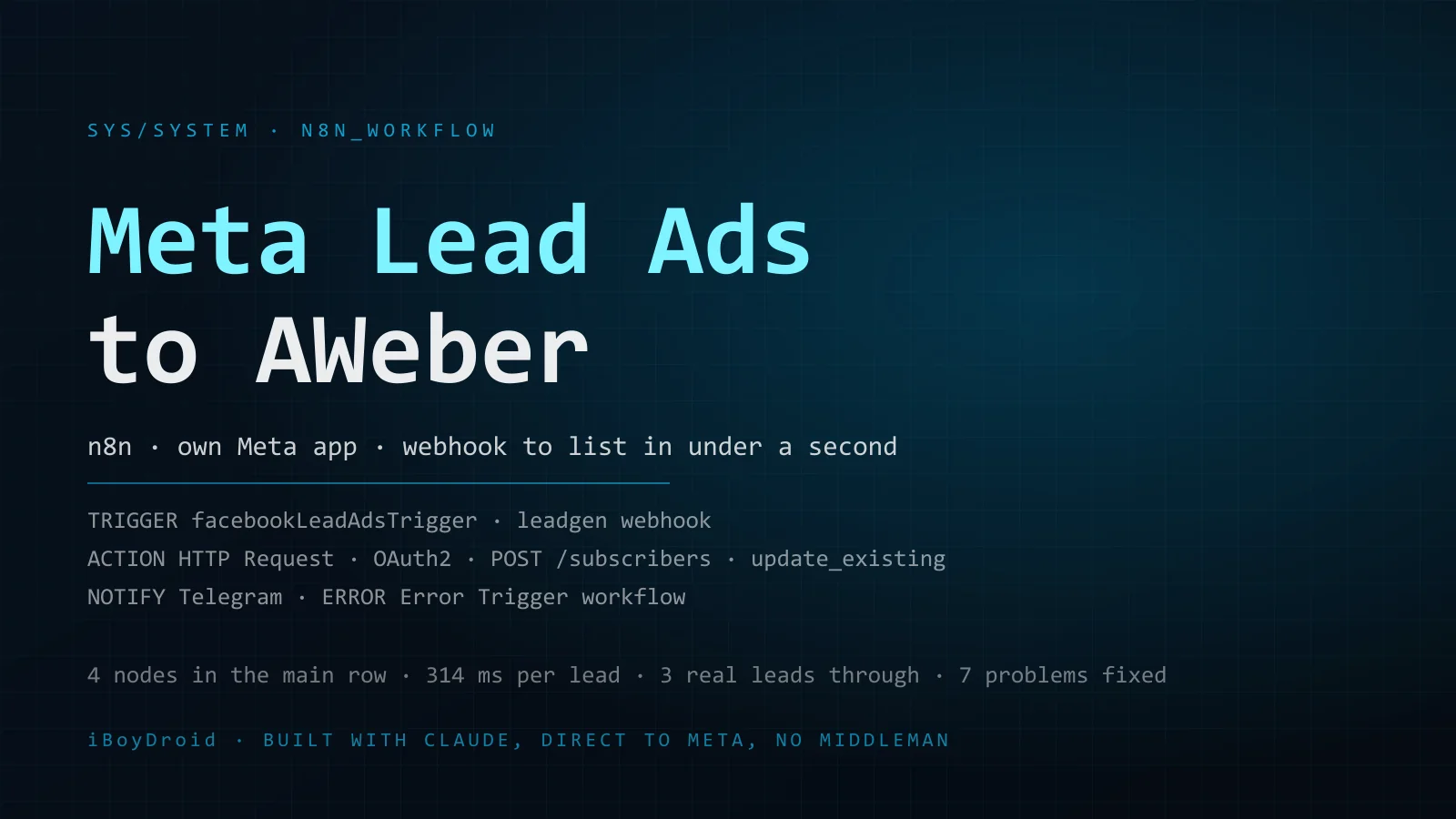
Four nodes on n8n Cloud take a Meta instant-form lead into an AWeber list, tagged, and into a Telegram thread. The recorded run took 314 ms, and nothing from Zapier, Make or LeadsBridge sits in between.
Datoteke za uvoz
Očiščeni izvozi. Po uvozu dodajte svoje poverilnice in ID-je; stran natančno pove, katere.
Na tej strani
- 0. TL;DR
- 1. Why a three-node workflow is on this site
- 2. The ask, and how the idea happened
- 3. What was built
- 4. Setup, in order
- 5. Troubleshooting log: every error and its fix
- 6. What was added after the first session
- 7. Why n8n instead of Zapier, Make or LeadsBridge
- 8. Why direct to Meta instead of through a provider
- 9. What it costs
- 10. Why this is not an agentic workflow
- 11. Where the AI was wrong, and where the human was
- 12. What is left, and what I would change
- 13. Gotchas worth remembering
- 14. Get the workflow
- Appendix A. Node reference
- Appendix B. Update log
- Vprašanja, na katera odgovarja ta sistem
Status: live and in production. On 9 September 2026 every hop was proven with Meta's test lead except the final insert into AWeber, which refuses Meta's dummy address (test@meta.com) by design with HTTP 403. A test with my own email address, run manually, then went through to the list, and by 10 September 2026 three real submissions had followed through the form, the workflow and into the AWeber list end to end.
0. TL;DR
Someone fills in a Meta (Facebook) Lead Ads instant form on the Quick Ad Video page. Meta posts the lead to an n8n Cloud webhook. n8n maps the answers, creates or updates the subscriber on the Quick Ad Video list in AWeber with the tag meta-lead-ad, and posts the lead's details to Telegram. A separate two-node workflow catches any failure and posts the workflow name, the failing node and the error message to the same chat.
At the end of the build session three nodes did the job: the Facebook Lead Ads Trigger, a Set node (Map Lead Fields) and an HTTP Request node posting to AWeber. The Telegram node and the error workflow came later. Meta hands the lead to n8n within a second or two of submission; the one recorded production run took 314 ms from trigger to AWeber's reply.
It replaces the gap between a form submission on Meta and a subscriber in AWeber, which is otherwise bridged by a person exporting and importing leads, or by a paid connector on a subscription (section 7).
1. Why a three-node workflow is on this site
The first case study on this site is a 90-day kernel crash investigation. The first system is three nodes and a helper row. That contrast is on purpose.
Most business automation is this shape: a form on one platform, a list on another, no native connector between them. The workflow logic is trivial. The work is in the parts that are easy to skip: registering two OAuth apps with the right redirect URL, proving the webhook is actually registered with Meta rather than assuming it, making failures visible instead of silent, and adding a branch that tells someone when it breaks.
Every one of those produced an error on this build (section 5); none were on the canvas. A three-node workflow with the boring parts done right is worth more than a thirty-node one that fails without a trace, and a documented build is a template: the next client with a different page and list gets the same runbook with three values swapped.
2. The ask, and how the idea happened
The request, quoted from the first message: "create workflow in n8n that will trigger when on meta ads form is filled and it is connected to Aweber".
Starting state: an n8n Cloud instance with an empty canvas, no Meta developer app, no AWeber developer app, no credential for either platform.
Before touching the canvas Claude asked three questions. My answers, one line each:
- Is the Meta developer app and the Facebook Lead Ads credential already connected in this n8n instance? No, starting from zero.
- Is there already an AWeber developer app, with a Client ID and Secret from labs.aweber.com? No, one needs to be created.
- Besides email and name, what should carry over to AWeber for each lead? Once the workflow is finished, we will work on this.
The third answer set the scope. Email and name are all AWeber needs to create a subscriber; everything else on the form (phone, budget, business description, website) needs custom fields on a list that had not been chosen yet. Deferring the mapping meant the core chain could be proven with Meta's testing tool, which sends fixed dummy data, before anyone configured a list.
Claude then checked what n8n offers: a native Facebook Lead Ads Trigger node, and no AWeber node. AWeber's own n8n guide says to use the HTTP Request node with a generic OAuth2 credential, and that is what was built.
3. What was built
The main row is Meta Lead Ads Trigger, then Map Lead Fields, then Add to AWeber, then Send Confirmation. The trigger fires on every new lead for one page and one form. Map Lead Fields is a Set node holding the AWeber account and list ids and the expressions that turn Meta's data object into email, name, tags and the extra fields. Add to AWeber is an HTTP Request node posting to AWeber's subscribers endpoint. Send Confirmation is a Telegram node that posts the lead's details to a chat thread.
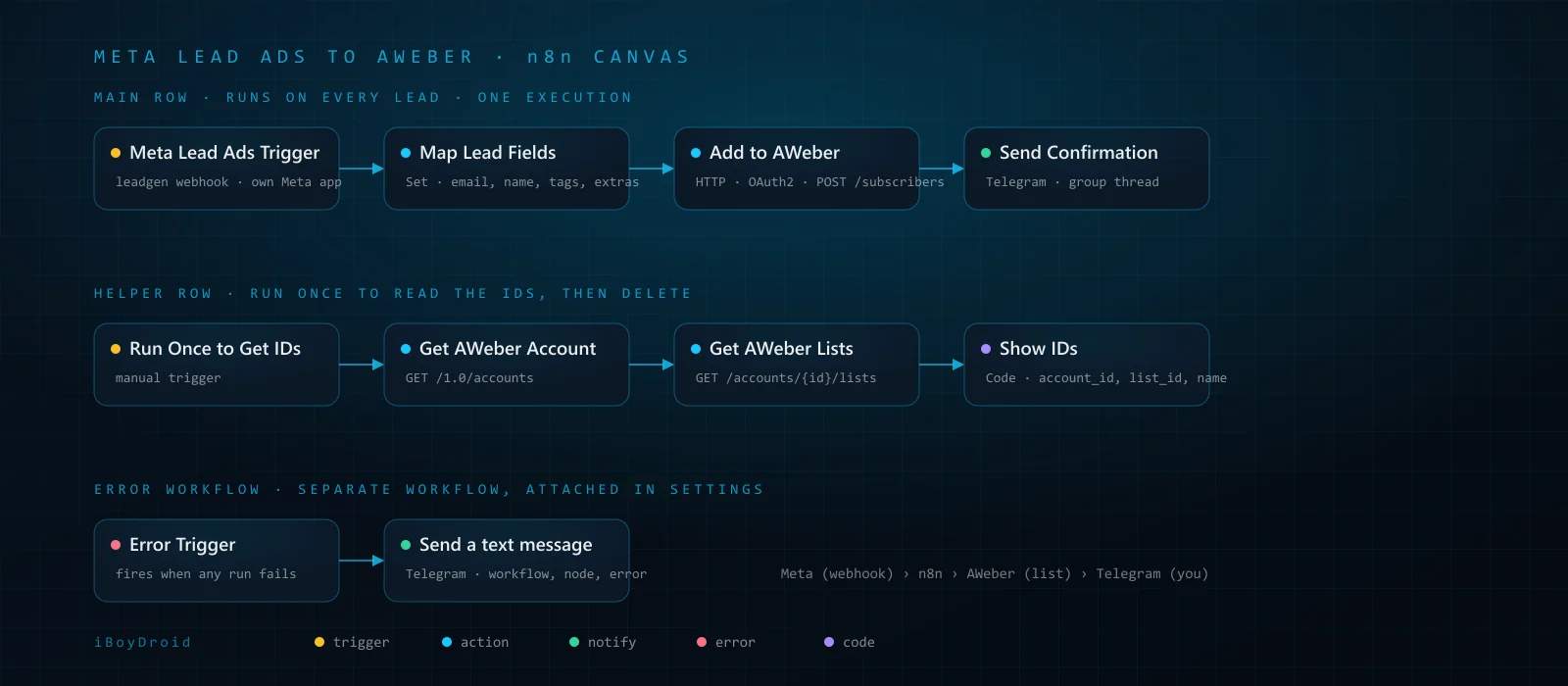
The helper row underneath is setup only: a manual trigger, two HTTP GETs (https://api.aweber.com/1.0/accounts, then that account's /lists) and a Code node that prints account_id, list_id, list_name and unique_list_id for every list. Run it once, paste the ids into Map Lead Fields, delete the row.
The error workflow is separate: an Error Trigger node into a Telegram node. n8n runs it when a workflow that names it as its error workflow fails; the message carries the workflow name, the failing node and the error message.
AWeber goes through HTTP Request plus a generic OAuth2 credential because n8n has no AWeber node, and AWeber's n8n guide recommends exactly this. The credential (Authorization Code grant against https://auth.aweber.com/oauth2/authorize and https://auth.aweber.com/oauth2/token) handles the token and its refresh; the nodes only need a URL and a body.
Three choices in Add to AWeber are deliberate:
update_existing: true. A repeat submission from the same address updates the subscriber instead of returning an error, and lead forms get repeat submissions.tags: ["meta-lead-ad"]. Every subscriber arriving through this route carries the tag, so AWeber segments and automations can act on the source.- Full Response on. AWeber answers a successful create with HTTP 201, an empty body and a
Locationheader pointing at the new subscriber; with Full Response that status and URL show in the execution instead of a blank output.
The request is a POST to https://api.aweber.com/1.0/accounts/<ACCOUNT_ID>/lists/<LIST_ID>/subscribers; section 4 has the body.
4. Setup, in order
The order matters: n8n Cloud has to tell you the redirect URL before either developer app can be created correctly.
1. Redirect URL. Open any OAuth2 credential in n8n Cloud; the window shows it. On n8n Cloud it is https://oauth.n8n.cloud/oauth2/callback, not the instance's own /rest/oauth2-credential/callback path. Both developer apps use it.
2. AWeber developer app. At labs.aweber.com create an app: client type Confidential, OAuth redirect URL from step 1. Copy the Client ID and Client Secret.
3. AWeber credential in n8n. Type: OAuth2 API (generic). Grant Type: Authorization Code. Authorization URL: https://auth.aweber.com/oauth2/authorize. Access Token URL: https://auth.aweber.com/oauth2/token. Scope: account.read list.read list.write subscriber.read subscriber.write. Auth URI Query Parameters: blank. Authentication: Body. Paste the ID and secret, Connect my account, approve in AWeber, then select the credential in all three AWeber HTTP nodes.
4. Meta developer app. At developers.facebook.com create an app of type Business with the use case "Capture & manage ad leads with Marketing API". Add the product Facebook Login for Business. In its Settings, add https://oauth.n8n.cloud/oauth2/callback (exact, no trailing slash) to Valid OAuth Redirect URIs, and keep Client OAuth login and Web OAuth login on. In App settings > Basic, add n8n.cloud to App Domains, add a Privacy Policy URL, and copy the App ID and App Secret.
5. Meta permissions. Under Use cases > Customize > Permissions and features, every permission n8n requests must show "Ready for testing": leads_retrieval, pages_show_list, pages_manage_metadata, pages_manage_ads, pages_read_engagement, business_management. Any still on "Add to App Review" needs one click; no App Review submission was needed for the admin's own pages.
6. Meta credential in n8n. In Meta Lead Ads Trigger create a Facebook Lead Ads credential: Client ID = App ID, Client Secret = App Secret. Connect and approve.
7. Page and form. Event = New Lead, then pick the Page and Form. Simplify Output stays on. Each lead arrives as one item with id, data (answers keyed by field name, such as data.email and data.full_name), form, ad, adset, page and created_time.
8. Ids. Execute the helper row. Show IDs prints one item per list. Put the account id and the chosen list id into aweber_account_id and aweber_list_id in Map Lead Fields.
9. Map Lead Fields. The core assignments as built in the session:
aweber_account_id = <ACCOUNT_ID>
aweber_list_id    = <LIST_ID>
email             = {{ $json.data.email || $json.data.work_email || '' }}
name              = {{ $json.data.full_name || [$json.data.first_name, $json.data.last_name].filter(Boolean).join(' ') }}
tags (array)      = {{ ["meta-lead-ad"] }}
10. Add to AWeber. POST to:
https://api.aweber.com/1.0/accounts/{{ $json.aweber_account_id }}/lists/{{ $json.aweber_list_id }}/subscribers
Authentication: Generic Credential Type, OAuth2 API, the AWeber credential. Send Body on, Specify Body = JSON:
{{ JSON.stringify({ email: $json.email, name: $json.name, tags: $json.tags, update_existing: true }) }}
Options > Response > Full Response: on.
11. Workflow settings. Save failed production executions: Save. On this workflow it read Do not save, and a failed run left no trace (section 5, item 6).
12. Live mode. Switch the Meta app to Live. In Development mode the admin can connect and receive test leads, but real leads never reach the webhook.
13. Publish. Publishing registers the production webhook: n8n creates the app-level subscription and subscribes the page's leadgen field itself through the Graph API. Do not create, edit or remove that entry by hand.
14. Test. In the Lead Ads Testing Tool (developers.facebook.com/tools/lead-ads-testing) pick the page and form, create a dummy lead, check the Executions tab. For a real result, use the tool's Preview form with a real email and look for the tagged subscriber on the list.
5. Troubleshooting log: every error and its fix
1. "The domain of this URL isn't included in the app's domains."
Seen: on the first Connect, Meta's login dialog refused with "The domain of this URL isn't included in the app's domains. To be able to load this URL, add all domains and subdomains of your app to the App Domains field in your app settings." The dialog URL contained redirect_uri=https://oauth.n8n.cloud/oauth2/callback.
Cause: Claude's first instructions said to register the instance's /rest/oauth2-credential/callback path, which is the self-hosted path. n8n Cloud routes every OAuth2 callback through oauth.n8n.cloud. The AWeber instructions had the same wrong URL.
Fix: Facebook Login for Business > Settings > Valid OAuth Redirect URIs: add the oauth.n8n.cloud URL. App settings > Basic > App Domains: add n8n.cloud. The AWeber Labs app, created later, got the right URL from the start.
Who: I hit it and pasted the dialog URL into the chat. Claude read the redirect_uri from it, said the error was its own, and gave the two edits. I applied them.
2. "Invalid Scopes: pages_manage_metadata"
Seen: after fix 1, the dialog refused again.
Cause: Meta only accepts a permission in the login request once it is added to the app's use case. Five of six showed "Ready for testing"; pages_manage_metadata still showed "Add to App Review".
Fix: one click. Connect then succeeded, with no App Review submission.
Who: Claude, in the Meta dashboard.
3. Testing tool warnings: "App does not have a webhook subscription", "App is not subscribed to leadgen field", several "Missing permission" lines.
Seen: in the Lead Ads Testing Tool with the workflow unpublished and n8n not listening.
Cause: they describe exactly that state. n8n creates the app's webhook subscription and the page's leadgen subscription itself when the trigger's Execute step starts listening (temporary, about two minutes) or the workflow is published (permanent), and removes the temporary one when listening stops. A manual webhook entry with the /webhook-test/ URL cannot even be saved, because Meta's verification ping is only answered while a listen is active.
Fix: none. With n8n listening the diagnostics went green; after publishing, "This app has no issues".
Who: Claude explained it, then proved it by publishing (item 5).
4. One dummy lead per form.
Seen: the tool would not create a second dummy lead.
Cause: it allows one per form.
Fix: delete the earlier one, start n8n listening, then create the new one, in that order. The lead arrived with data.email = test@meta.com; Map Lead Fields produced email and name correctly.
Who: Claude, operating the tool.
5. A stray trigger blocked publishing.
Seen: n8n would not publish.
Cause: a second, unconfigured trigger node on the canvas.
Fix: remove it. The three AWeber nodes were deactivated (no credential yet) and the workflow published as a webhook proof. Result: "This app has no issues", the app's Webhooks page showing the production callback with leadgen Subscribed, and a test lead producing execution #4281, Succeeded.
Who: Claude.
6. The first end-to-end attempt vanished. Seen: with AWeber connected and the ids in, a dummy lead showed Track status Success in Meta and no execution in n8n. Cause: "Save failed production executions" read Do not save on this workflow, so the failed run left no trace. n8n documents Save as the default, so the setting had been changed somewhere; whichever way an instance is set, the Executions tab is only trustworthy once this reads Save. Fix: set it to Save and re-test. Who: Claude, by checking workflow settings after confirming Meta had delivered.
7. Execution #4291 failed at AWeber with HTTP 403. Seen: the run took 314 ms and failed with "Forbidden". The response body: "The email address provided cannot be accepted at this time." Cause: AWeber refusing test@meta.com. Not a credential problem: OAuth succeeded and the request hit the correct account and list URL. Fix: none in the workflow. A manual run with my own email address went through to the list, and three real leads followed the next day (section 12). Who: Claude read the response body instead of guessing at scopes or tokens.
Published versions, in order: "Initial build"; "Meta trigger connected and tested"; "Webhook proof (AWeber nodes disabled)"; "AWeber connected, IDs set".
6. What was added after the first session
The export of the main workflow postdates the session log and differs from it in five places, all my work after the session.
Send Confirmation. A Telegram node (v1.2) after Add to AWeber. The message opens with "New Lead Is Here" and the name, then Full Name, Budget (value followed by a dollar sign), Phone Number, Business Description (the label is spelled "Descreption" in the node), Website, Email, then "AD Campaign" with the ad field, then a $now timestamp formatted MM.dd.yyyy HH:mm:ss. Values come from $('Map Lead Fields').item.json; attribution is off.
Extra fields in Map Lead Fields. budget from data['monthly_ad_budget?'], phone from data.phone_number, business desciption (spelled that way in the node) from data['what_best_describes_your_business?'], website from data.website, and ad, which is not an expression but the fixed string "music ad".
Rename. "Add Subscriber to AWeber" is now "Add to AWeber". Parameters unchanged.
The error workflow. "Meta Lead Ads to AWeber Error": Error Trigger into a Telegram node. The template is a failure header, then Workflow: {{$json["workflow"]["name"]}}, Node: {{ $json.execution.lastNodeExecuted }}, Error: {{$json["execution"]["error"]["message"]}}, and a timestamp. Same chat and thread as Send Confirmation. Active, caller policy "any", execution progress saved.
Settings. saveDataErrorExecution = all (the change from section 5, item 6) and active = true.
Plainly: the AWeber request body is unchanged and still sends only email, name, tags and update_existing. The extra fields go to Telegram and nowhere else.
7. Why n8n instead of Zapier, Make or LeadsBridge
n8n was not chosen from a blank slate: the client already ran an n8n Cloud instance. The question was whether n8n could do this job well, not whether it was cheapest. Five reasons.
The Meta side is native. n8n ships a Facebook Lead Ads Trigger node. On publish it creates the webhook subscription on the Meta app and subscribes the Page to the leadgen field itself. The trade is that it runs under the client's own Meta app, the setup cost section 4 walks through.
No premium-app gate. On Zapier, Facebook Lead Ads is a premium app, paid plans only, so the floor is Professional at $19.99 a month billed annually ($29.99 monthly) for 750 tasks.
One execution per lead, whatever the node count. n8n's definition: "An execution is a single run of your entire workflow. It doesn't matter how many steps are in the workflow or how much data it processes." The Telegram confirmation costs nothing extra, and the error workflow runs only on failure. Zapier counts one task per successful action step, so the same flow is two tasks per lead. Make counts one credit per module run, trigger included: three credits per lead, or four if Get Lead Details is needed after the trigger, as the module's description on Make's integration page suggests.
A generic OAuth2 credential reaches any API. n8n has no AWeber node. It still took one HTTP Request node with a generic OAuth2 API credential, which is what AWeber's own "Set Up AWeber API Integration in n8n" guide prescribes: authorization code grant, scope account.read list.read list.write subscriber.read subscriber.write, authentication in the body. One POST carries email, name, tags and update_existing.
Self-hosting, logging and retries are yours. The Community Edition is free under the Sustainable Use License for "your own internal business purposes". Failed executions are saved with the failing node and response body, which is how AWeber's 403 was read. Retry On Fail is per node, two to five tries, up to 5,000 ms apart. The Error Trigger receives the workflow name, the last node executed and the error message, which the second workflow forwards to Telegram.
To be fair: Zapier ships six prebuilt AWeber actions with Tags exposed, and Make's AWeber app has 24 modules, including Add a Subscriber with a Tags field. Both connect to Meta by logging into Facebook under the vendor's registered app (Make also accepts your own client credentials as an advanced option), so there is no developer app, no redirect URI and no Live-mode switch. The first lead would have flowed sooner on either.
There is also a path that needs no connector at all. Since March 2025 AWeber has had a native Facebook Lead Ads integration under Account Integrations. It maps name and email only, allows one Facebook account per AWeber account, picks the list and tags by rule, and AWeber's own docs send anyone who needs custom fields to a third-party tool. For a form that asks six questions, with every answer wanted in Telegram now and in AWeber custom fields next, it was the wrong shape from the start. For a name-and-email form it is the right answer, and it costs nothing.
| n8n | Zapier | Make | LeadsBridge | AWeber native | |
|---|---|---|---|---|---|
| Trigger type | Native node, webhook | "New Lead", instant (webhook) | "New Lead" instant, or "Watch Leads" polling | Real-time | Meta to AWeber, no connector |
| Whose Meta app | The client's own | Zapier's | Make's, own credentials optional | LeadsBridge's | AWeber's |
| Per-lead metering unit | Execution | Task | Credit | Lead (any record moved) | None, free |
| Steps per lead counted | 1, regardless of nodes | 2 (AWeber, Telegram); trigger free | 3 to 4, trigger included | 1 | n/a |
| AWeber support | No node; one HTTP Request node, generic OAuth2 | 6 prebuilt actions, Tags | 24-module app, Tags on Add a Subscriber | Destination, lists and tags | Name and email only; list and tag by rule; one Facebook account |
| Extra steps (Telegram, custom logic) | Free, same execution | 1 task each | 1 credit each | Not offered | Not offered |
| Self-host | Yes, free Community Edition | None listed | None listed | None listed | n/a |
| Error visibility | Saved failed executions, per-node retries, Error Trigger | Zapier Manager "New Zap Error", 1 task per error | Error handlers free; Telegram on error route, 1 credit per failure | Not verified | Not verified |
8. Why direct to Meta instead of through a provider
"Direct" is mechanical. On publish, the trigger node created a Page webhook subscription on the client's Meta app with the n8n production URL as callback and leadgen as the field, then subscribed the Page to the app. Meta's testing tool confirmed it: "This app has no issues", and the app's Webhooks page showed the production callback with leadgen subscribed. From then on Meta posts each lead to the client's n8n instance, which posts it to AWeber. No vendor server sits in that path.
Through a provider the path is longer. LeadsBridge's authorisation lets it "fetch information from that Ad Account"; its DPA names it a processor of leads collected via Lead Ads, its servers sit in AWS data centres, and its privacy policy says personal data "may be transferred to, and stored at, a destination outside the European Economic Area". Zapier's troubleshooting guide says that when a Page's lead access has been customised, the app named "Zapier" must be given CRM access, because "CRM permissions allow Zapier to receive live lead data from Facebook".
Why that matters for a business selling into the EU:
- Fewer parties touch the lead: Meta, the client's n8n instance, AWeber, and Telegram for the notification.
- No per-lead price: executions are the unit.
- No dependency on someone else's Meta app. From 18 to 26 June 2026 Zapier's status page carried "Facebook Lead Ads intermittently missing leads", attributed to Meta's webhook delivery to third-party apps, and its closing note said missed leads "won't be resent or backfilled". With your own app the recovery is yours: Meta keeps lead data for 90 days and exposes it through the Graph API.
- Retries and logs are yours. Meta's side: "If any update sent to your server fails, we will retry immediately, then try a few more times with decreasing frequency over the next 36 hours." n8n's side: per-node retries, saved failed executions, the Error Trigger.
The honest cost of direct is section 4: a Meta app (Business type with Facebook Login for Business, as built here); the n8n Cloud callback https://oauth.n8n.cloud/oauth2/callback as a Valid OAuth Redirect URI (Claude's first instruction gave the instance's own callback path, and Meta answered "The domain of this URL isn't included in the app's domains"); the domain under App Domains; every requested permission added to the app's use case (before pages_manage_metadata was added, Meta answered "Invalid Scopes: pages_manage_metadata"); a Privacy Policy URL; and the app in Live mode, because in Development mode Meta only releases leads submitted by people who hold a role on the app. Standard Access covered the client's own Page, so no App Review was needed. A provider hides all of that behind its own approved app. That is what its fee buys.
9. What it costs
Per month, annual billing unless stated, read from the vendors' pages on 9 September 2026. Zapier, Make, LeadsBridge and DigitalOcean price in USD; n8n Cloud and Hetzner in EUR. Zapier and Make rows include the Telegram step; n8n includes it free.
| Option | 100 leads | 500 leads | 2,000 leads | Basis |
|---|---|---|---|---|
| n8n Cloud, existing instance | 0 extra (100 of 2,500 executions) | 0 extra (500 of 2,500) | 0 extra (2,000 of 2,500) | Starter 20 EUR, 2,500 executions; Pro 50 EUR, 10,000 |
| n8n self-hosted | 5.49 EUR | 5.49 EUR | 5.49 EUR | Software 0; Hetzner CX23 excl. VAT and IPv4; DigitalOcean 1 GB droplet $6 |
| Zapier, 2 tasks per lead | $19.99 (Pro 750) | $39.00 (Pro 1,500) | $89.00 (Pro 5,000) | Monthly billing $29.99, $58.50, $133.50 |
| Make, 3 to 4 credits per lead | $0 (Free, 300 to 400 of 1,000) | $9 (Core 10k) | $9 (Core 10k, 6,000 to 8,000); $16 for Core 20k | Monthly billing $10.59 and $18.82 |
| LeadsBridge, per lead | from $22 (Starter, 800 leads; $29 monthly) | from $22 (Starter) | Starter tops out at 2,000; Pro from $60 ($79 monthly) | Free is 50 leads, 1 bridge, 2 fields |
| AWeber native integration | $0 | $0 | $0 | Name and email only, one Facebook account, no custom fields |
Sources: n8n pricing (https://n8n.io/pricing/); n8n Community Edition (https://docs.n8n.io/deploy/host-n8n/community-edition-features); Hetzner (https://docs.hetzner.com/general/infrastructure-and-availability/price-adjustment/); DigitalOcean (https://www.digitalocean.com/pricing/droplets); Zapier pricing (https://zapier.com/pricing); Zapier tasks (https://help.zapier.com/hc/en-us/articles/8496196837261-How-is-task-usage-measured-in-Zapier); Zapier premium apps (https://help.zapier.com/hc/en-us/articles/8496061306253-How-to-get-started-with-Facebook-Lead-Ads-on-Zapier); Make pricing (https://www.make.com/en/pricing); Make operations (https://help.make.com/operations); LeadsBridge pricing (https://leadsbridge.com/pricing/); LeadsBridge plans (https://support.leadsbridge.com/hc/en-us/articles/44150688061844).
Plainly: for a name-and-email form, AWeber's own integration is free and enough. Beyond that, at 100 leads a month Make's free tier is the cheapest connector on paper, and Make Core at $9 undercuts n8n Cloud Starter at every volume in the table if you start from nothing. One caveat: the free tier allows two active scenarios, so a main scenario plus a separate failure-alert scenario fills it.
n8n was still the choice. The instance was already running and paid for, so the workflow added executions to an existing allowance, not a new subscription. One metering unit: adding Telegram, custom fields or a scoring branch later does not change the bill. The client's own Meta app, per section 8. Headroom: 2,000 leads still sit inside Starter's 2,500 executions, while Zapier climbs to $89. One licence condition: hosting n8n for other people and charging them for access is outside the Sustainable Use License and needs a separate commercial agreement with n8n; a client running it on its own server for its own business is fine.
The "free" claim, precisely. The software is free to self-host. Meta lists no price for webhook delivery in its webhook or Marketing API documentation, though no Meta page uses the word "free". AWeber's API access and Labs developer account are free; the AWeber plan itself (Free at 500 subscribers, Lite from $15 a month, Plus from $30) is the cost of the email tool, not of the integration. The only bill the integration adds is hosting.
10. Why this is not an agentic workflow
The pipeline is a fixed schema map. Meta delivers each lead as a field_data array of name and value pairs; with Simplify Output on, the trigger hands them over keyed by field name: data.email, data.full_name, data.phone_number, data.website, the business-description question and the monthly-ad-budget question. The Set node copies each into a named subscriber field and the HTTP Request node sends email, name, tags and update_existing to AWeber. The whole execution ran in 314 ms. Field names are fixed per form, so the mapping is a lookup, not an interpretation.
An LLM step would add three things. Cost: a 400-input, 120-output-token mapping call is about $0.0010 per lead on Claude Haiku 4.5 ($1.00 per 1,000 leads), $0.0020 on Claude Sonnet 5 ($2.00 per 1,000) and $0.000068 on gpt-5-nano ($0.07 per 1,000). Latency: third-party benchmarks put time to first token at 0.6 to 0.96 s for Haiku 4.5 and about 1.5 s for Sonnet 5, so a 120-token JSON answer adds roughly 1.3 to 2.7 s per lead, against 314 ms for the whole execution. Non-determinism: Anthropic's API reference says "even with temperature of 0.0, the results will not be fully deterministic", and models released after Opus 4.6 no longer support setting temperature; OpenAI says seed-based "determinism is not guaranteed". Structured outputs fix the shape, not the values: OpenAI's docs say "Structured Outputs can still contain mistakes". A June 2026 study of more than 6,000 public n8n workflows (arXiv 2606.29116) examined how those workflows guard their LLM steps and found the engineering support around them thin. A wrong phone number written to AWeber is a schema-valid failure no parser catches.
The guidance is not mine. Anthropic's "Building effective agents": "workflows offer predictability and consistency for well-defined tasks, whereas agents are the better option when flexibility and model-driven decision-making are needed", and agentic systems "often trade latency and cost for better task performance". n8n's docs draw the same line: a chain "follows a predetermined sequence of calls", an agent "uses a language model to determine which actions to take". Nothing here needs a decision.
A model earns its place later, on the two answers that carry judgement rather than identity: the budget and the business description. Scoring a lead from them costs about $0.0016 per lead on Haiku 4.5 ($1.60 per 1,000) or $0.0032 on Sonnet 5 ($3.20 per 1,000); drafting a first reply about $0.0022 to $0.0044 ($2.20 to $4.40 per 1,000); both together on Sonnet 5 about $7.60 per 1,000, halved through the Batch API if scoring can run nightly. That belongs on a side branch after the AWeber write, so a slow or failed model call never blocks the subscriber, and its output lands in a tag or the Telegram message.
11. Where the AI was wrong, and where the human was
Where Claude was wrong:
- The redirect URL. The first instructions said to register the instance's own
/rest/oauth2-credential/callbackpath in both developer apps. That is the self-hosted path; n8n Cloud sendshttps://oauth.n8n.cloud/oauth2/callback. It cost one failed Meta login and a round of dashboard edits. Claude's words: "that error is on me". The AWeber app avoided the same mistake only because the Meta failure came first. - The Meta app use case. The first instructions said use case "Other". The app as configured uses "Capture & manage ad leads with Marketing API", and it was inside that use case's permission list that the missing scope had to be enabled.
- An unverified aside. Explaining the App Domains error, Claude added that Meta throws that exact complaint when no login product is configured. The record does not show whether that applied, because the redirect URI and App Domains fixes went in together.
- A limit, stated. Claude could not export the chat transcript, said so, and wrote a reconstructed log instead. The log and the chat agree everywhere I checked, but it is a reconstruction, not a recording.
Where Claude was right:
- The helper row. Rather than sending me into AWeber's interface for ids, it built a row that reads them with the workflow's own credential. It ran first time and returned all four lists.
update_existing: true, before any repeat submission had happened.- Full Response, reasoning that AWeber's 201 with an empty body would otherwise look like nothing happened.
- The invisible failure. Meta said Success, n8n showed nothing. Claude checked the workflow settings rather than the credentials and found "Do not save".
- The 403. It opened the failed execution and read AWeber's response body, which named the cause and confirmed everything before it had worked.
- The scope. Found the one permission of six not yet ready and fixed it with one click.
- The testing tool. Explained why the warnings were expected, then settled it by publishing instead of arguing.
What I did:
- Supplied every credential and secret: created the AWeber developer account, pasted the client secret into the credential Claude had prefilled, created the Meta app, applied the redirect URI and App Domains fixes, and pasted the dialog URL that exposed the redirect mistake.
- Chose the list (Quick Ad Video, of four) and the test method (a dummy lead now, rather than the Preview form).
- Approved each dashboard change. Claude offered to make the Meta edits itself and waited for the word.
- After the session: the Telegram node, the extra fields in Map Lead Fields, the rename and the error workflow.
12. What is left, and what I would change
From the session log, with what has closed since:
- The real-email test: done. A manual execution with my own email address created the subscriber on the Quick Ad Video list with the
meta-lead-adtag, the proof the dummy lead could not give. As of 10 September 2026 three real leads have followed through the form and the workflow end to end. If the list has confirmed opt-in, each of those subscribers received a confirmation email. - Custom field mapping. Create matching custom fields on the list (List Settings > Custom Fields), then extend the body of Add to AWeber. The log left this ready:
{{ JSON.stringify({
  email: $json.email,
  name: $json.name,
  tags: $json.tags,
  update_existing: true,
  strict_custom_fields: false,
  custom_fields: {
    Phone: $json.phone,
    Website: $json.website,
    Budget: $json.budget,
    Business: $json['business description']
  },
  misc_notes: 'Meta lead. Ad: ' + ($json.ad || '')
}) }}
Names must match AWeber's field names exactly. strict_custom_fields: false stops an unknown name from failing the whole request. This body reads $json['business description'] while the node emits business desciption; rename the key first.
- Delete the helper row once the workflow is proven.
- Keep the Meta app in Live mode. If it drops back to Development, real leads stop.
What I would change, from reading the export:
- The
x || xfallbacks. Four of the added expressions repeat the same key on both sides of the||(data['monthly_ad_budget?'] || data['monthly_ad_budget?'], and likewisephone_number,websiteand the business question). Harmless, but they look like a fallback and are not. Drop the second term or make it a real alternative, as the email expression does withwork_email. - Spelling. The key
business desciptionand the Telegram label "Descreption". Rename the key, fix the label, keep the custom-field body in step. - The hard-coded campaign label.
adis the fixed string "music ad". The trigger deliversadandadsetobjects withidandnameon every real lead, so the label should be{{ $json.ad?.name || $json.adset?.name || '' }}(the testing tool sends empty ad fields, hence the fallback). The moment a second campaign runs against the same form, every Telegram message names the wrong one. The template on this page ships with the expression. - Error workflow wiring. The main workflow's export has no
errorWorkflowkey undersettings, and n8n only starts an error workflow when that key names one. As exported, the main workflow does not point at the error workflow, so a failure produces a saved execution and nothing in Telegram. Set Settings > Error workflow, then prove it with a real production failure (break the list id, send a test lead): a manual run from the editor never fires an error workflow. - Retry On Fail on Add to AWeber. The export shows no retry setting, so it is off. Turn it on with a short wait for transient cases (an AWeber 5xx, a timeout). It will not help a 403; a rejected address stays rejected.
- A fallback for rejected addresses. Today a 403 fails the run: Send Confirmation never fires, and the error workflow, once wired, posts the error message but not the lead. AWeber answers 403 for more than one reason (its abuse filter, role-based addresses such as info@, the 120-requests-per-minute limit), and the abuse rejection must not be retried. Set On Error on Add to AWeber to continue using the error output, and route that branch to a Google Sheet row or a Telegram message carrying the lead's fields. A lead AWeber rejects is still a lead.
- Telegram parse mode. Neither Telegram node sets Parse Mode, and n8n's Telegram node then sends legacy Markdown. An underscore in an email address or a website (jane_doe@example.com) is an unclosed italic marker to Telegram, which answers 400 "can't parse entities" and turns a lead AWeber has already accepted into a failed run. Set Parse Mode to HTML on both nodes and escape
&,<and>in every dynamic value. The template on this page ships that way. - The error message template. The error workflow reads
execution.error.messagewith no optional chaining. When the failure is in the trigger itself, n8n sends atriggerobject instead ofexecution, the expression throws, the alert about the failure fails too, and nothing catches that. Use optional chaining with a fallback and addexecution.urlso the message links to the run. Applied in the template. - A guard for leads without an email. A form with no email field, or a lead where Meta returns null, posts
email: ""and AWeber answers 400. An IF node before Add to AWeber that sends empty emails to Telegram only is cheaper than a failed run. - Timezone. Neither workflow sets one, so
$nowfollows the instance default and the timestamp carries no zone. Set Workflow Settings > Timezone and print the zone, or use Meta's owncreated_timefrom the trigger. - AWeber's field limits. The API spec caps
nameat 60 characters,emailat 50,misc_notesat 60 andad_trackingat 20, and a custom field value may not be an empty string. The custom-field body above needs a.slice()on the name and a filter that drops empty values before it goes live.
13. Gotchas worth remembering
- On n8n Cloud every OAuth2 credential uses
https://oauth.n8n.cloud/oauth2/callback; the/rest/oauth2-credential/callbackpath belongs to self-hosted n8n. Read it from the credential window. - Meta's login dialog rejects any permission not yet added to the app's use case, with "Invalid Scopes: <permission>". Check the permission list before the first Connect.
- The trigger's Execute step registers a temporary webhook, listens for about two minutes, then removes it, so the testing tool's diagnostics go yellow between tests. Only publishing registers the permanent webhook.
- Meta allows one webhook callback per app. Running Execute step while the workflow is published steals the webhook from the live version; n8n's docs say unpublish, test, republish.
- The testing tool allows one dummy lead per form. Delete the old one before creating another, and start n8n listening first.
- Only the
leadgenfield on the Page object is needed, and n8n subscribes it itself. Do not touch the entry n8n created. - AWeber rejects test@meta.com with HTTP 403 and "The email address provided cannot be accepted at this time." Only a real address completes the test.
- A workflow whose "Save failed production executions" reads Do not save fails invisibly. Check it before trusting an empty Executions tab; n8n documents Save as the default, but this workflow had it off.
- A successful AWeber create is a 201 with an empty body and a
Locationheader. Without Full Response it looks like an empty result.
14. Get the workflow
The sanitised JSON for both workflows, main and error, is downloadable from this page. Stripped: the AWeber account and list ids, the Meta page and form selections, every credential reference, the Telegram chat and thread ids, the campaign label, and n8n's own export ids (workflow, version, webhook, instance). Everything else is as it runs, with four small fixes from section 12 applied: the misspelled field key and label, the collapsed x || x fallbacks, the campaign label as an expression, and Parse Mode HTML with escaped values and optional chaining on both Telegram nodes.
After importing both, three things to fill in:
- Credentials. A Facebook Lead Ads credential on the trigger, an OAuth2 API credential for AWeber on the three HTTP nodes, a Telegram bot credential on both Telegram nodes. Section 4 has every field.
- Page and form. Pick them in the trigger once the Meta credential connects.
- Ids. Run the helper row and paste the AWeber account and list ids into Map Lead Fields; put your Telegram chat id into both Telegram nodes (and a thread id if the chat uses topics); select the error workflow in the main workflow's Settings.
Then save, publish and test as in section 4.
Appendix A. Node reference
Main workflow, "Meta Lead Ads to AWeber":
| Node | Type | Key parameters |
|---|---|---|
| Setup Notes | Sticky note | The one-time setup steps |
| Meta Lead Ads Trigger | Facebook Lead Ads Trigger (v1) | Event New Lead; Page = Quick Ad Video (<PAGE_ID>); Form = Higher intent (<FORM_ID>); Simplify Output on; Facebook Lead Ads OAuth2 credential |
| Map Lead Fields | Set (v3.4), manual mapping | aweber_account_id = <ACCOUNT_ID>; aweber_list_id = <LIST_ID>; email, name, tags (array) as in section 4; budget, phone, business desciption, website from data; ad = fixed string |
| Add to AWeber | HTTP Request (v4.2) | POST to the subscribers endpoint (section 4, step 10); OAuth2 API credential; JSON body { email, name, tags, update_existing: true }; Full Response on |
| Send Confirmation | Telegram (v1.2), send message | Chat <CHAT_ID>, thread <THREAD_ID>; text built from $('Map Lead Fields').item.json; attribution off |
| Helper Notes | Sticky note | How to run the helper row once and delete it |
| Run Once to Get IDs | Manual Trigger (v1) | None |
| Get AWeber Account | HTTP Request (v4.2) | GET https://api.aweber.com/1.0/accounts; OAuth2 API credential |
| Get AWeber Lists | HTTP Request (v4.2) | GET https://api.aweber.com/1.0/accounts/{{ $json.entries[0].id }}/lists; OAuth2 API credential |
| Show IDs | Code (v2) | One item per list: account_id, list_id, list_name, unique_list_id |
Main workflow settings: execution order v1; saveDataErrorExecution: all; caller policy: workflows from the same owner; active.
Error workflow, "Meta Lead Ads to AWeber Error":
| Node | Type | Key parameters |
|---|---|---|
| Error Trigger | Error Trigger (v1) | None; fires when a workflow naming this one as its error workflow fails |
| Send a text message | Telegram (v1.2), send message | Chat <CHAT_ID>, thread <THREAD_ID>; text: workflow name, execution.lastNodeExecuted, execution.error.message, timestamp; attribution off |
Error workflow settings: caller policy any; save execution progress on; saveDataErrorExecution: all; active.
Appendix B. Update log
| Date | Change |
|---|---|
| 2026-09-09 | Published. |
| 2026-09-10 | Status updated: the real-email test passed (manual run with my own address) and three real leads have been processed in production. Cover figures updated. |
Kratki odgovori, neposredno iz gradnje
Vsak odgovor izhaja iz zgornje dokumentacije in vodi do razdelka, ki vsebuje podrobnosti.
- What happens when someone submits the Meta lead form?
Meta pushes the lead to n8n's Facebook Lead Ads Trigger over a webhook, usually within a second or two of the submit. A Set node called Map Lead Fields pulls email, name, phone, website, budget and business description out of the form answers and attaches the tag meta-lead-ad. An HTTP Request node then posts email, name, tags and update_existing: true to AWeber's subscribers endpoint for the Quick Ad Video list, so a repeat submission updates the existing subscriber instead of failing. A Telegram node posts the full lead into a group thread, and the whole n8n run took 314 ms in the recorded execution.
Preberi razdelek- Does n8n have an AWeber node?
No. n8n ships a native Facebook Lead Ads Trigger but nothing for AWeber, and there is no community node on npm either. I used a plain HTTP Request node with a generic OAuth2 API credential (Authorization Code grant, https://auth.aweber.com/oauth2/authorize, https://auth.aweber.com/oauth2/token, scope account.read list.read list.write subscriber.read subscriber.write, Authentication set to Body), which is also what AWeber's own n8n guide describes. A helper row of four nodes (a manual trigger, two GETs and a Code node) calls GET /1.0/accounts and GET /1.0/accounts/<ACCOUNT_ID>/lists once so you can read your account id and list ids inside n8n, then it can be deleted.
Preberi razdelek- What do I need to connect Facebook Lead Ads to AWeber in n8n, and how long does it take?
You need admin rights on the Facebook Page, a Meta developer app of type Business with the Facebook Login for Business product, an AWeber account plus a free developer app at labs.aweber.com, an n8n instance (n8n Cloud in this build) and, for the notifications, a Telegram bot. Both developer apps must list https://oauth.n8n.cloud/oauth2/callback as the OAuth redirect, because that is the URL n8n Cloud sends for every OAuth2 credential. This build went from an empty canvas to a live workflow with the AWeber call reaching the right account and list in a single session on one day, and most of that time went into Meta app settings rather than the workflow itself.
Preberi razdelek- Why does Meta say 'The domain of this URL isn't included in the app's domains' when I connect the n8n Facebook Lead Ads credential?
That message appears when the redirect URI n8n sends is not whitelisted in your Meta app. On n8n Cloud the URI is https://oauth.n8n.cloud/oauth2/callback, not your instance's own /rest/oauth2-credential/callback path, which is only right for self-hosted n8n and was the wrong URL Claude first gave me. The fix is two settings in the Meta app: add https://oauth.n8n.cloud/oauth2/callback under Facebook Login for Business > Settings > Valid OAuth Redirect URIs with no trailing slash, and add n8n.cloud under App settings > Basic > App Domains.
Preberi razdelek- How do I fix 'Invalid Scopes: pages_manage_metadata' in the n8n Facebook Lead Ads Trigger?
n8n's credential asks Meta for leads_retrieval, pages_show_list, pages_manage_metadata, pages_manage_ads, business_management and pages_read_engagement, and Meta rejects the login if any of them is not attached to the app's use case. In this app every scope was already Ready for testing except pages_manage_metadata, which still showed Add to App Review. Open Use cases > Customize > Permissions and features for the 'Capture & manage ad leads with Marketing API' use case and add that permission; it flips to Ready for testing and Connect succeeds. Because the app admin manages the Page, Standard Access was enough and no App Review submission was needed.
Preberi razdelek- Why does AWeber return 403 'The email address provided cannot be accepted at this time' when n8n posts the subscriber?
Meta's Lead Ads Testing Tool fills its dummy lead with test@meta.com, and AWeber refuses that address with HTTP 403 and 'The email address provided cannot be accepted at this time.' It is not a credential or URL problem: in execution #4291 the lead came from Meta, the trigger fired, mapping worked, OAuth to AWeber succeeded and the POST hit the right account and list. AWeber says this 403 means the address was blocked by its abuse mitigation and must not be retried; role-based addresses such as admin@ or support@ get the same treatment. A manual run with my own email address then went through to the list with the meta-lead-ad tag, and three real leads followed the next day. To prove it yourself before going live, run the workflow once with a real name and email.
Preberi razdelek- Why does Meta's Track status say Success but n8n shows no execution?
In my case the run had failed and n8n had thrown it away, because the workflow setting 'Save failed production executions' read Do not save. Switch it to Save and the failure shows up in the Executions tab with the node and the reason, which is how the AWeber 403 became visible on the second attempt. Two other things cause the same symptom: the Meta app sitting in Development mode, which only releases leads from people with a role on the app, and the trigger's test listener having expired, since Execute step only listens for about two minutes and removes its temporary webhook when it stops. Publishing the workflow registers the permanent webhook, and Meta allows only one per app, so a test run while published temporarily steals it from the live version.
Preberi razdelek- Can I connect Facebook Lead Ads to AWeber without Zapier or LeadsBridge?
Yes. AWeber has a free native Facebook Lead Ads integration, but it maps only name and email, supports one Facebook account per AWeber account and cannot map custom fields, which AWeber's own docs say needs a third-party tool. On Zapier, Facebook Lead Ads is a premium app that needs at least the Professional plan, and LeadsBridge's free tier stops at 50 leads a month. In n8n the native Facebook Lead Ads Trigger talks to your own Meta app and one HTTP Request node talks to AWeber's API, so the lead goes Meta to n8n to AWeber with no third party holding it, plus a Telegram message with every form answer and an error workflow when something breaks.
Preberi razdelek- How much does it cost to run Facebook Lead Ads to AWeber on n8n compared with Zapier or Make?
For this client it adds nothing, because they already run n8n Cloud and n8n counts one execution per lead no matter how many nodes run; the Starter plan is 20 EUR a month billed annually for 2,500 executions, so 2,500 leads a month fit. The same three steps on Zapier cost two tasks per lead since trigger steps are free, and because Facebook Lead Ads is a premium app the floor is Professional at $19.99 a month billed annually for 750 tasks, roughly 375 leads. Make's Core plan is $9 a month for 10,000 credits at three to four credits per lead, and its free tier covers about 100 leads a month. Meta's webhook, AWeber's API and a Telegram bot cost nothing.
Preberi razdelek- Do I need an AI agent to map Facebook lead fields into AWeber?
No, and adding one would make the workflow worse. Meta delivers every lead as a fixed set of field keys such as data.email, data.full_name and data.phone_number, so a Set node maps them in-process with no model call, and the recorded run finished in 314 ms. An LLM mapping step would add roughly one to three seconds per lead, cost about a dollar per thousand leads on a small model, and return output that is correct in shape but not guaranteed in content. Claude did most of the work here at build time, clicking through n8n, Meta and AWeber, not at run time.
Preberi razdelek- How was Claude used to build this n8n workflow?
Claude worked through a browser control tool: it built the nodes on the n8n canvas, wrote the expressions, created the AWeber Labs app, prefilled the n8n OAuth2 credential with everything except the client secret, ran the helper row to read the account and list ids, drove Meta's Lead Ads Testing Tool and opened the failed execution to find the AWeber 403. I created the developer accounts, pasted the secret, applied the Meta app fixes, chose the Quick Ad Video list and decided what to send. Claude was also wrong once in a way that cost real time: its first instructions gave the self-hosted redirect URL instead of https://oauth.n8n.cloud/oauth2/callback, which produced the App Domains error. The Telegram confirmation node and the separate error workflow were added after that session.
Preberi razdelek
Vaš sistem
Potrebujete takšen sistem?
Vsak sistem tukaj se je začel kot resničen delovni tok, ki ga je nekdo opravljal ročno. Opišite svojega in bo zgrajen, dokumentiran na enak način in predan skupaj z datoteko.