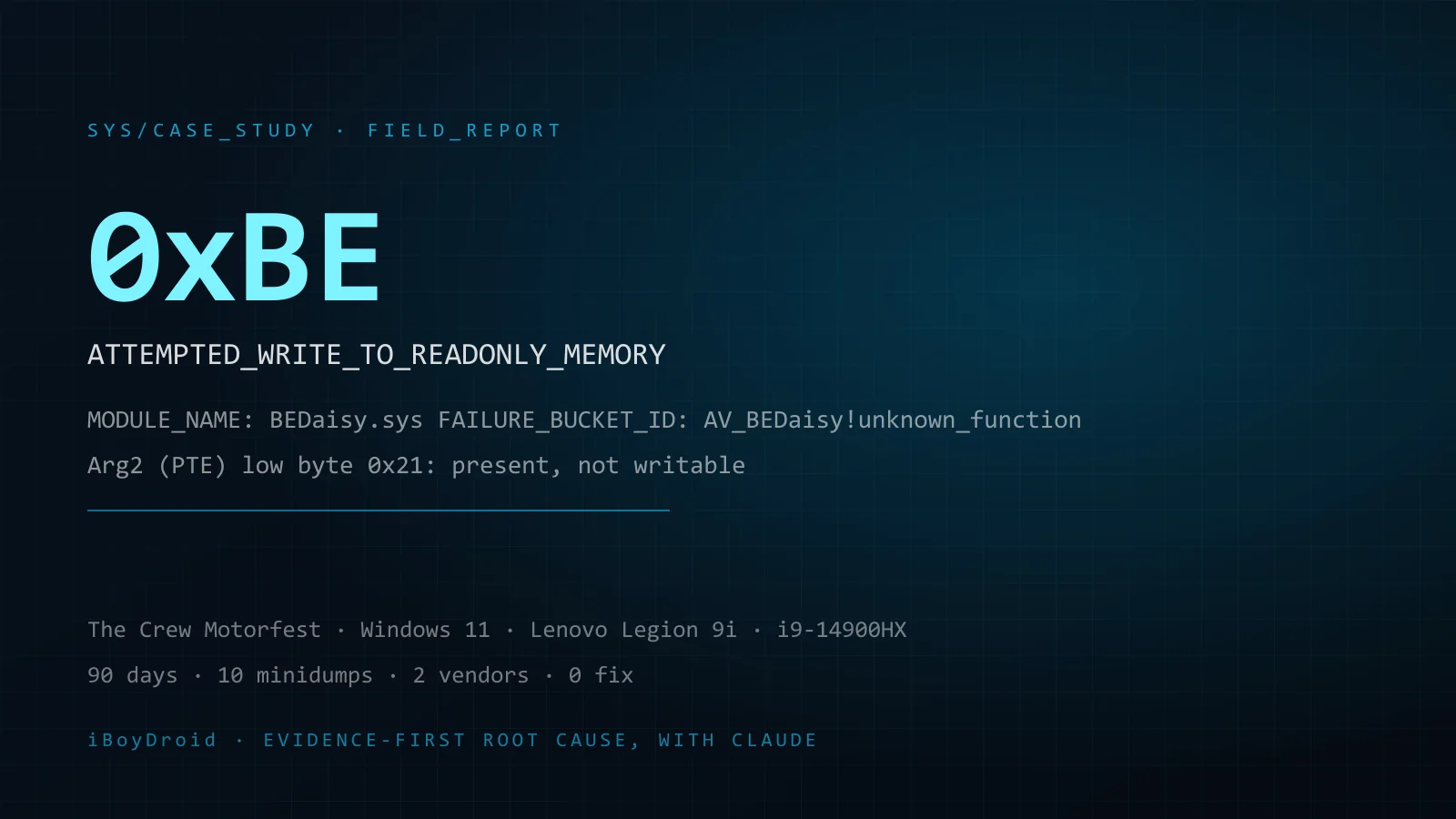
SYS/CASE_STUDY · FIELD_REPORT
Proving a kernel crash lives inside a vendor's anti-cheat driver
BEDaisy.sys, stop code 0xBE, Windows 11, Lenovo Legion 9i. Ninety days, ten minidumps, two vendors, zero fix.
En esta página
- 0. TL;DR
- 1. Why this is on a business site
- 2. The short version, in five facts
- 3. Background
- 4. The crash, in plain language
- 5. Timeline
- 6. Investigation session 1: 26 May 2026 (Windows 11 24H2)
- 7. Between the sessions: 27 May to 12 June
- 8. Investigation session 2: 13 to 14 June 2026 (The Crew Motorfest, Windows 11 25H2)
- 9. The crash signature, both sessions side by side
- 10. Complete elimination log
- 11. Vendor contact log
- 12. External corroboration and sources
- 13. Where the AI was wrong, and where the human was
- 14. Alternatives considered, and open items
- 15. Where things stand, and what would resolve it
- 16. If you have the same crash: a fifteen-minute self-check
- Appendix A. WinDbg !analyze -v output (session 2, newest dump)
- Appendix B. Commands used
- Appendix C. Artifact inventory
- Appendix D. Evidence index (screenshots)
- Appendix E. Method note: parsing kernel minidumps without a debugger
- Appendix F. Update log
- Appendix G. Glossary
- Preguntas que responde este caso
Status: living document. Last updated 27 August 2026. No fix and no substantive vendor response as of this date.
0. TL;DR
On 25 May 2026 I bought The Crew Motorfest. Every launch blue-screened my laptop with ATTEMPTED_WRITE_TO_READONLY_MEMORY (0xBE), faulting driver BEDaisy.sys, which is BattlEye's kernel-mode anti-cheat. Two support organizations told me, in different words, that it was my machine.
Over two investigation sessions, with Claude doing the heavy analysis and me supplying evidence, constraints and hands on the BIOS, we parsed ten kernel minidumps by hand (no symbol server), parsed five Windows event-log sessions, ran WinDbg on the freshest dump, and eliminated every host-side variable that exists: GPU driver, system file integrity, peripheral drivers, BIOS version (the latest release and an older one), Memory Integrity, kernel stack protection, CPU power limits, Turbo Boost, E-cores, Hyper-Threading, and finally the entire virtualization stack down to a UEFI-locked Credential Guard that kept relaunching the hypervisor behind my back.
The result is a diagnosis, not a fix: BattlEye's driver writes into a read-only page inside its own loaded image, on every crash, with zero hardware errors logged and every firmware-level and Windows-level hardware diagnostic passing, and it keeps doing it after a Windows feature update, after a BIOS downgrade and re-update, after a verified hypervisor-free boot, and while 140+ other games (including titles protected by the competing anti-cheat, Easy Anti-Cheat) run at maximum settings on the same hardware. An independent Microsoft Q&A thread from January 2025 shows a different user, on a desktop, on Windows 10, in a different Ubisoft game, crashing at the identical instruction offset inside the same driver.
Both vendors have the evidence. BattlEye's last reply was a generic checklist on 2 June. Ubisoft locked the Discord thread on 9 June for "missing system files", received the files on 13 June, acknowledged them on 24 June, closed the case, and directed me back to the locked thread.
This page is the full record: evidence, method, wrong turns, elimination log, vendor log, sources.
1. Why this is on a business site
I build automation infrastructure with AI: n8n pipelines, agentic workflows, scraping engines, dashboards. Clients ask, reasonably, what "using AI properly" means when the problem is hard and the answer is not on the first page of Google.
This investigation is the clearest demonstration I have. Not because the AI was always right. It was wrong more than once, and twice in the same direction (it wanted the problem to be my hardware), and the evidence killed every one of those hypotheses. What made it work was the shape of the collaboration:
- I brought raw artifacts (minidumps, event logs, WinDbg output, BIOS screenshots) instead of descriptions.
- The AI parsed binary formats it had no tooling for, computed the memory math, and read the logs for facts I would have missed (a hypervisor start event proving a BIOS change had not taken; a specific launcher message that proves a whole line of troubleshooting was a dead end).
- I held the constraints the AI kept trying to talk itself out of: 140 games run fine, EAC titles run fine, nothing else on the machine crashes.
- Every hypothesis got one clean test, changing one variable, with the result read from a log rather than from a feeling.
That is the workflow I sell. The subject happens to be a game. The method transfers to every "vendor says it's your setup" problem a business has.
2. The short version, in five facts
- The crash is always the same. Bug check 0xBE, faulting module BEDaisy.sys, the driver attempting to write to a page in its own image that is mapped read-only. Every minidump and every crash record in the event logs, across two months and two Windows builds, agrees.
- It is not the hardware. Zero WHEA (machine-check) events in any crash session. Every firmware-level (pre-boot) and Windows-level (post-boot) hardware diagnostic passes. The CPU, GPU and RAM run every other workload, including heavier games and titles protected by Easy Anti-Cheat, without a fault, and the crash is identical with every external device disconnected.
- It is not the Windows or firmware configuration. The crash survived the elimination of every relevant BIOS and Windows variable, including a verified hypervisor-free boot (msinfo32: "Virtualization-based security: Not enabled",
lsaiso.exeabsent). It survived a Windows feature update from 24H2 to 25H2 and every cumulative update since, and it survived a BIOS downgrade followed by a re-update to the latest release. - It is not unique to this machine. The same instruction offset (
BEDaisy+0x343926), the same failure bucket (AV_BEDaisy!unknown_function) and the same failure hash appear in another user's public dumps from January 2025 on completely different hardware and OS. - Nobody who could fix it has engaged with the evidence. Ubisoft's frontline collected DxDiag and MSInfo (user-mode inventories, useless for a kernel fault) and never opened a dump. BattlEye sent a form reply and went silent after the engineering report.
3. Background
3.1 The system
| Component | Detail |
|---|---|
| Laptop | Lenovo Legion 9i Gen 9 (16IRX9), machine type 83G0 |
| CPU | Intel Core i9-14900HX (8 P-cores + 16 E-cores, 24 cores / 32 threads) |
| GPU | NVIDIA GeForce RTX 4090 Laptop |
| RAM | 64 GB |
| Storage | NVMe SSD, Intel VMD enabled |
| OS at first crash (26 May 2026) | Windows 11 Home 24H2, build 26100 |
| OS at second session (13 June 2026) | Windows 11 Home 25H2, build 26200 (HAL 10.0.26100.1) |
| BIOS | Lenovo NXCN23WW (latest available, released October 2025), WER BIOSRevision 1.23.0.0; an older release was also installed and tested (section 10.2) |
| Firmware | UEFI, Secure Boot on |
| Overclock / undervolt | None |
| Hardware health | Zero WHEA-Logger events in every crash session; every pre-boot (firmware) and post-boot (Windows) hardware diagnostic passes |
3.2 The game
The Crew Motorfest, Ubisoft's open-world racing game, purchased on 25 May 2026 on Steam and launched through Steam into Ubisoft Connect. It is protected by BattlEye, which installs and loads the kernel-mode driver BEDaisy.sys every time the game starts. The player cannot disable it.
One correction to the record up front: my 26 May messages to both vendors call the game "The Crew 2". That was my mistake on a long first day. The game was The Crew Motorfest from the beginning, which is what the Ubisoft case, the Discord thread and every message after 1 June say. The crash analysis is unaffected; the driver is the same, and the dumps do not care what the game is called.
3.3 The constraint that shaped everything
Over 140 other games run on this laptop at maximum settings without a fault. That includes titles substantially heavier on the CPU and GPU than either Crew game, and titles protected by Easy Anti-Cheat, which is also a kernel-mode anti-cheat driver. Nothing else on the system crashes. No application, no driver, no background service.
That single fact does most of the work in this case study. Any hypothesis of the form "your hardware is marginal" or "your Windows is broken" has to explain why the fault appears only when one specific vendor's kernel driver is loaded, and never otherwise. Neither vendor ever addressed it.
The picture inside the BattlEye set is not uniform either. Most other BattlEye-protected titles on this machine run normally. A few show a similar crash, but only after much longer sessions. The two Crew titles are the extreme case: every launch in May, every session since. That spread is itself informative. The common component is the driver; how often its faulting path gets hit appears to depend on the title.
4. The crash, in plain language
A blue screen with stop code 0xBE means a piece of code running in the Windows kernel tried to write to a memory page that is marked read-only. Windows halts immediately rather than let the write corrupt anything. Only kernel-mode code (drivers and the kernel itself) can produce this stop code. Ordinary programs, game launchers and overlays cannot, because they never run in the kernel; at worst they crash themselves.
When Windows can identify the driver, it prints the name on the crash screen. Here it printed BEDaisy.sys every time.
The two numbers Windows records with a 0xBE tell you what happened:
- Argument 1 is the address the driver tried to write to.
- Argument 2 is the page table entry (PTE) for that address. Its low bits are protection flags. A low byte of
0x21means the page is present (bit 0 set) and not writable (bit 1 clear).
In every dump we opened, Argument 1 landed inside BEDaisy's own loaded image and Argument 2 said the page was read-only. In other words: BattlEye's driver was writing into itself, into a region Windows had mapped read-only, and Windows stopped it. The behavior is consistent with a self-check or anti-tamper routine inside the driver; the exact function is unknown because BattlEye does not publish symbols for it.
Reference: Microsoft's bug check 0xBE documentation (see Sources).
5. Timeline
| Date (2026) | Event | Evidence |
|---|---|---|
| 25 May | The Crew Motorfest purchased. First launch blue-screens during BattlEye's "Updating... / Starting BattlEye Service" step, before the game renders a frame. Every launch attempt repeats it. | E-01 ("I bought the game yesterday") |
| 26 May, afternoon | Investigation session 1. Event logs and ten minidumps parsed. Five crashes in a 57-minute window (14:37, 14:58, 15:05, 15:32, 15:34). Root cause narrowed to BEDaisy.sys writing to its own image at a fixed offset. | Session 1; dumps 052626-*.dmp; logs_2/3/4.evtx |
| 26 May | Discord thread opened in Ubisoft's official support server (the-crew-motorfest channel). Ubisoft Support manually creates case 26109481 from it. | E-01, E-10 |
| 26 May, 16:50 | BattlEye ticket #230396 auto-acknowledged. | E-04 |
| 26 May, 17:59 | Full problem description sent to BattlEye: system, symptom, five dumps (four 0xBE, one 0xA), the EAC constraint, the list of steps already taken. | E-04, E-05 |
| 27 May to 8 June | Two weeks of frontline troubleshooting on Discord with five different agents: clean boot, Ubisoft Connect cache clear, 100% display scaling, secondary GPU driver update, separate Windows profile, firewall/AV/Defender whitelisting, overlays off, full-screen optimizations off, Game Mode toggled, config delete, reinstall of supporting software. DxDiag and MSInfo submitted more than once. | E-10; June 14 report (E-08) |
| 1 June, 17:18 | Remote session (TeamViewer / AnyDesk) requested so an agent could see the machine. | E-10 |
| 1 June, 18:51 | Remote session declined on privacy and security policy grounds. Updated DxDiag and MSInfo requested. | E-10 |
| ~1 June | A Reddit thread suggests disabling Intel Rapid Storage Technology, which I did in BIOS. The game launches for the first time. The crash does not go away; it moves from BattlEye startup to in-game transitions (opening the ESC menu, entering an event, changing key bindings). Timing becomes random, from about two minutes to about an hour. | E-10, E-06 |
| 2 June, 21:32 | BattlEye replies with a generic checklist (see section 11). | E-05 |
| 4 June, 03:36 | Reply to BattlEye: every item on the checklist already done; progress report on the changed crash timing; request for further investigation. | E-06 |
| 9 June, 05:36 | Ubisoft locks the Discord thread, citing inactivity and not having received the requested system files. | E-10 |
| between 26 May and 13 June | Windows moves from 24H2 (26100) to 25H2 (26200) through routine Windows Update; the machine is kept current at all times (exact date not recorded). The crash persists across the feature update and every cumulative update since. | 26 May ticket text vs 14 June report |
| 13 June | msinfo.txt (1.3 MB) uploaded to Ubisoft case 26109481, as requested on Discord. | E-02 |
| 13 to 14 June | Investigation session 2. Five event-log sessions and a fresh minidump analyzed; WinDbg !analyze -v; full elimination sequence including CPU power limits, Turbo Boost, E-cores, Hyper-Threading, and the complete virtualization teardown. Session 5 crash with the hypervisor verified off closes the host-side question. | Session 2 |
| 14 June, 01:23 | Seven-section engineering report sent to BattlEye on ticket #230396, offering all dumps, logs, and willingness to run a debug driver build. | E-06 to E-09 |
| 24 June | Ubisoft replies on the case: thanks for the files, the case existed only to collect them, it is being closed, do not reopen it, continue on Discord, and if the thread is locked open a new one referencing the old one. | E-03 |
| 30 July | Message on the Ubisoft case: one month, zero response on Discord, thread never reopened. Launch test the same day: crash. No reply, consistent with Ubisoft's 24 June instruction not to use the case. | E-03 |
| 27 August | No BattlEye reply since 2 June (86 days). No Ubisoft action since 24 June (64 days). Case portal still shows "In Progress". Most recent launch test, 30 July: crashed. | E-01, E-03 |
6. Investigation session 1: 26 May 2026 (Windows 11 24H2)
Starting point: every launch blue-screens at the BattlEye service start, before the first frame. The crash screen names BEDaisy.sys and stop code 0xBE. I uploaded the Windows System event logs and, in two batches, ten kernel minidumps from C:\Windows\Minidump\.
6.1 The tooling problem
Claude's sandbox had no WinDbg and no access to Microsoft's symbol server. So the minidumps were parsed by hand: reading the Windows triage-dump header directly (bug check code and the four parameters at fixed offsets), locating the loaded-module list and the string pool inside the dump, reconstructing the module map (base address, size, name length for each driver), and resolving each crash address against that map with a binary search. The event logs (.evtx) were parsed with the python-evtx library to pull Event 1001 (BugCheck) and Event 41 (Kernel-Power) records with timestamps and bug check parameters. Appendix E describes the method.
6.2 First hypothesis, and the first correction
The AI's first read was the textbook one for a 0xBE: a GPU driver or marginal RAM. It proposed DDU, a driver rollback, MemTest86, and checking for an overclock or XMP profile.
I pushed back with the constraint from section 3.3: far heavier games run at maximum settings, EAC-protected games run flawlessly, nothing else crashes. If RAM or VRAM were unstable under load, a heavier game would expose it more, not less.
The AI accepted the correction and dropped the hardware framing. What survived from its argument was one useful piece: varying stop codes still mean memory is being corrupted; the question is by what. The obvious candidate was already in every dump: a kernel driver that exists in memory only while this game runs. A web check confirmed the game requires BattlEye and that the player cannot turn it off.
6.3 A theory from the internet, dismissed on the evidence
A common forum claim is that the crash comes from running "64-bit Steam with 32-bit Uplay". It does not survive contact with the stop code. A 0xBE is a kernel fault; a disagreement between two user-mode launchers can crash the game or the launcher, never the kernel. Community fixes for the game's ordinary (user-mode) crashes were noted for completeness: unlinking extra accounts from the Ubisoft profile (more than three linked accounts, or an Amazon or Facebook link, is a documented crash trigger), and clearing the Ubisoft Connect cache. They address a different failure mode.
6.4 The first batch of dumps
Five minidumps (052626-21609-01, 052626-21671-01, 052626-21734-01, 052626-22406-01, 052626-23203-01): four 0xBE, one 0xA (IRQL_NOT_LESS_OR_EQUAL), each at a different absolute address. BEDaisy.sys was loaded at the moment of every crash. The dumps' string pools also named other third-party drivers as bystanders: logi_joy_vir_hid.x64.sys (Logitech), AppleLowerFilter.sys, AppleKmdfFilter.sys, netaapl64.sys (Apple device support), and others.
6.5 What I did that afternoon (none of it changed the outcome)
| Step | Detail | Result |
|---|---|---|
| Clean GPU driver reinstall | DDU in safe mode, then reinstall; also a rollback to the previous driver | Crash |
| System file integrity | sfc /scannow found and repaired corrupt files; DISM /Online /Cleanup-Image /RestoreHealth | Crash |
| Core Isolation | Memory Integrity (HVCI) off; Kernel-mode Hardware-enforced Stack Protection off | Crash |
| Driver Verifier | Confirmed disabled (verifier /querysettings shows no flags) | n/a |
| Peripheral software | Logitech G HUB and other peripheral / RGB software uninstalled | Crash |
| BattlEye reinstall | BattlEye folder deleted; game files verified in Steam (36 files reacquired) | Crash |
| Firmware and drivers | BIOS, Windows and all drivers confirmed current | n/a |
At one point the BattlEye Launcher showed Failed to start BattlEye Service (1053) instead of crashing. 1053 is the Service Control Manager's start timeout. The AI read the two symptoms as the same root cause with two faces: when the service manages to start, BEDaisy.sys loads and faults; when it cannot start in time, the launcher reports the timeout. Later, on the June system, the Application log also showed BEService.exe faulting in ntdll.dll with c0000409 (STATUS_STACK_BUFFER_OVERRUN, a fail-fast), a user-mode companion to the kernel-mode fault.
6.6 The second batch of dumps: the finding that closed the diagnosis
Five fresh minidumps from after all of the above, plus logs_4.evtx. The event log placed them at 14:37, 14:58, 15:05, 15:32 and 15:34: essentially every launch attempt that afternoon. Four were 0xBE, one was 0x50 (PAGE_FAULT_IN_NONPAGED_AREA), which is another known BEDaisy stop code.
Resolving the write-target address (Argument 1) against the module map in each dump gave the same answer every time: the address is inside a single 7.5 MB module (size 0x780000) at the same offset, +0x28a2ca. Example from 052626-15187-01.dmp: write target 0xfffff802634fa2ca, module base 0xfffff80263270000. The dump contains exactly one module of that size, it is the crash target, and its name is eleven characters long, which matches BEDaisy.sys exactly.
Two conclusions followed, and both held for the rest of the investigation:
- Deterministic, not random. Same driver, same internal offset, five crashes in a row. Random hardware corruption does not hit the identical address five times. This ended the hardware question for session 1.
- BattlEye writing to itself, not fighting another driver. The Logitech and Apple drivers appeared in the dumps as bystanders, not as the faulting party. The peripheral-driver chase, which the AI had pushed because those are the usual suspects, was a red herring. Uninstalling them ruled them out; it was never going to fix anything.
6.7 Independent confirmation from BattlEye's own launcher
While looking for BattlEye logs I found the launcher's language template file, the master list of every message the BattlEye Launcher can display. Three entries in it matter because I never saw them:
DisallowedDriver=Disallowed driver: "%.*ls". Please unload it or reboot your system.This is the message BattlEye shows when it blocks a third-party driver. If Logitech, Apple or any other driver had been the problem, this is what would have appeared, not a blue screen.WindowsKernelMod=Windows Kernel modification detected. Please repair or reinstall your system.The message for a tampered kernel. Never shown.UpdateError=Update failed...The network failure message. Never shown; the update completes, and the crash comes at driver load.
Instead of any of these, the machine hard-crashed inside BEDaisy.sys. The driver died before the launcher could display a diagnostic. That is what a driver faulting on its own looks like, and it is the opposite of BattlEye rejecting something on the system.
6.8 Where session 1 ended
The diagnosis was written up as: a deterministic fault in the current BEDaisy.sys against Windows 11 24H2 build 26100. Two remaining paths were identified:
- A Windows in-place repair (Settings, System, Recovery, "Fix problems using Windows Update"), non-destructive, roughly an hour. This is also BattlEye's own documented last-resort recommendation for this class of failure. I performed it. No change.
- Escalation with evidence to both vendors. Both tickets went out the same day (section 11). Two blemishes in those 26 May messages, both mine: a leftover template placeholder ("[Add your CPU / GPU / RAM here.]") that I failed to fill in before sending, and the game misnamed as "The Crew 2". Both are visible in the evidence. The full hardware specification and the correct title were delivered in the 14 June report.
7. Between the sessions: 27 May to 12 June
Two things happened in this window that matter to the record.
The frontline loop. Two weeks in Ubisoft's Discord support with five different agents, working through the standard checklist. Every step was completed and reported. DxDiag and MSInfo were submitted more than once. Not one of the ten minidumps was requested or examined. On 1 June I asked for a remote session so someone could look at the machine directly; it was declined the same evening on policy grounds, with a request for updated DxDiag and MSInfo. On 9 June the thread was locked for inactivity and "missing" files.
The one change that changed anything. A Reddit thread suggested disabling Intel Rapid Storage Technology, which I did in BIOS. After that, the game launched for the first time. The fault did not go away; it moved. Instead of crashing at BattlEye startup, the machine now crashed on in-game transitions, at random intervals between about two minutes and about an hour. (The separate Intel VMD Controller setting stayed enabled through the June teardown, because the Windows install depends on it; see section 8.5.) Session 2 later noted that every perturbation in this period (the storage change, deleting the game config, disconnecting devices) bought a temporary reprieve and nothing more, which is itself a data point: the trigger is timing-dependent inside the driver, not tied to any one component.
The vendor replies in this window are in section 11. In short: BattlEye sent a form checklist on 2 June that repeated what had already been done, and did not respond to the 4 June reply.
In this window Windows moved from 24H2 (build 26100) to 25H2 (build 26200) through routine updates; the machine is kept current at all times. The crash was identical on both builds and has stayed identical through every cumulative update since.
8. Investigation session 2: 13 to 14 June 2026 (The Crew Motorfest, Windows 11 25H2)
Starting point: the full Discord transcript, fresh event logs from five separate boot sessions, a fresh minidump, and a machine that now launched the game and crashed inside it.
8.1 The second wrong hypothesis
This was a new chat, without the first session's context loaded. The AI's opening take, after reading the Discord thread, was correct about one thing and wrong about another.
Correct: nobody on the vendor side had analyzed the dumps, and the dumps were the actual evidence.
Wrong: it read the pattern (varying crash addresses, "works for an hour then dies", every random change helping briefly, crashes on transitions) as the signature of marginal hardware, specifically the well-documented Intel 13th/14th-gen Vmin-shift instability, and proposed that BattlEye was the canary rather than the cause. It backed this with a web search on i9-14900HX instability reports and microcode revisions.
The proposed test was a good one, and that is the point: instead of arguing, we ran it. Cap the maximum processor state to 99% (which disables Turbo Boost entirely), then reduce the CPU power limits, and see whether the crash changes. It did not. Combined with zero WHEA-Logger events across every session, the CPU theory was dead within the first hour of session 2. The AI later stated plainly, when I asked about a warranty claim, that the hardware evidence was weak precisely because the logs were clean and everything else ran.
8.2 The first WinDbg pass
I installed WinDbg and ran !analyze -v on the newest dump. The output (Appendix A) gave the missing detail the hand-parsed dumps could not: the faulting instruction.
- Bug check
0xBE. Argument 1 (write target)fffff80034e489ff. Argument 2 (PTE)090000106eff8121. - Faulting frame
BEDaisy+0x343926, which resolves tofffff80034f93926, giving a BEDaisy image base offffff80034c50000. - The write target is therefore at offset
0x1F89FF(about 2.07 MB) inside BEDaisy's own image. - The PTE's low byte is
0x21: present, not writable. The target page was mapped read-only at fault time. - Fault chain:
BEDaisyissues the write,nt!KiPageFault,nt!MmAccessFault,nt!MiSystemFault,nt!KeBugCheckEx. FAILURE_BUCKET_ID: AV_BEDaisy!unknown_function,FAILURE_ID_HASH: {36b04c21-521f-babb-382f-2a12c3ddef17}.Hypervisor.Flags.AnyHypervisorPresent: 1,IsHyperV: 1,VsmAvailable: 1.
Same diagnosis as session 1, now with the instruction pointer and the page protection proven rather than inferred.
8.3 The hypervisor theory, and the discovery that it had never been tested
The hypervisor flags pointed at a plausible mechanism: this laptop runs Docker and WSL2, which keep a Hyper-V hypervisor loaded. BattlEye's driver runs anti-VM and anti-tamper routines; a driver that detects a hypervisor and switches into a self-protection path that writes into its own image would produce exactly this fault. Memory Integrity had been off for two weeks with no change, but Memory Integrity and the hypervisor are different things, and the bare presence of the hypervisor had never been isolated.
First attempt: a second boot entry, "Windows 11 - Gaming (Hypervisor Off)", created with bcdedit and set to hypervisorlaunchtype off. Booted into it, played for two minutes, crashed.
Before treating that as a result, the AI insisted on verifying that the hypervisor had actually been off. It had not. The event log from that session showed lsaiso.exe running (Credential Guard's isolated process, which only exists when virtualization-based security is live) and a successful Microsoft-Windows-Hyper-V-Hypervisor start event at 21:04, in a session whose own boot configuration string read HYPERVISORLAUNCHTYPE=OFF. The explanation was in an earlier Core Isolation screenshot: "Local Security Authority protection: On". A UEFI-locked Credential Guard was force-launching the hypervisor regardless of the boot setting, and regardless of the BIOS virtualization switch.
So the hypervisor theory was not disproven; it had not been tested. Three separate attempts to remove the hypervisor had been silently undone.
8.4 The cheap tests first: E-cores and Hyper-Threading
Rather than fight the firmware lock immediately, the AI proposed the zero-risk test first. The i9-14900HX is a hybrid chip (8 performance cores, 16 efficiency "Atom" cores), and anti-cheat drivers choking on the P/E split is a real, vendor-acknowledged class of problem; it is why Lenovo ships a "Legacy Game Compatibility Mode" in this BIOS.
- BIOS, Active Atom Cores: Disabled. Reboot, play. Crash (0xBE), plus one 0x5C
HAL_INITIALIZATION_FAILEDon one boot with the cores disabled. - Hyper-Threading: Disabled. Crash.
Both reverted afterward.
8.5 The full virtualization teardown
With the cheap tests negative, the only untested variable left was the hypervisor, which meant defeating the Credential Guard lock properly. Precaution first: the BitLocker recovery key retrieved and kept on a phone, since these changes can trigger a recovery prompt. Then, in order:
- Windows Security, Device security, Core isolation: Local Security Authority protection set to Off.
- Registry (admin Command Prompt), four values set to 0:
DeviceGuard\EnableVirtualizationBasedSecurity,DeviceGuard\Scenarios\HypervisorEnforcedCodeIntegrity\Enabled,DeviceGuard\Scenarios\CredentialGuard\Enabled,Lsa\LsaCfgFlags. Exact commands in Appendix B. - Windows features (admin PowerShell) disabled:
Microsoft-Hyper-V-All,VirtualMachinePlatform,HypervisorPlatform,Microsoft-Windows-Subsystem-Linux. bcdedit /set hypervisorlaunchtype off.- BIOS: Intel Virtualization Technology (VT-x) Disabled; VT-d Disabled.
One trap avoided along the way: the BIOS also exposes an "Intel VMD Controller" setting. It is not virtualization; it is the NVMe storage controller mode the Windows install was built on. Disabling it can make the boot drive disappear (INACCESSIBLE_BOOT_DEVICE). It stayed enabled.
Verification before launching anything: msinfo32 reported "Virtualization-based security: Not enabled". Task Manager showed no lsaiso.exe and no "Secure System" process. For the first time in the entire investigation, the machine was booted with no hypervisor present.
8.6 Session 5: the decisive result
The game crashed at 22:47 with an identical signature: 0xBE, BEDaisy.sys, write target fffff803a21f4cbb, zero WHEA events. With the hypervisor verifiably absent, the anti-VM mechanism was ruled out, and with it the last host-side variable anyone had proposed.
8.7 Per-session forensic evidence
Every crash across the five sessions is bug check 0xBE in BEDaisy, at a different absolute address each time, with zero WHEA-Logger events in any session.
| Session | Configuration under test | Hypervisor present? | Bug check(s) | Example Argument 1 | WHEA events |
|---|---|---|---|---|---|
| 1 | Baseline (Memory Integrity already off for two weeks) | Yes: Hyper-V + IsolatedUserMode + lsaiso.exe active | 0xBE | fffff800'34e489ff | 0 |
| 2 | Same configuration, two further boots | Yes: lsaiso.exe active | 0xBE, twice | ...4d439015, ...87c48db7 | 0 |
| 3 | E-cores (Active Atom Cores) disabled | Reduced: no lsaiso.exe | 0xBE (plus one 0x5C HAL_INITIALIZATION_FAILED on one boot) | 0 | |
| 4 | Turbo Boost disabled (maximum processor state 99%) | Minimal | 0xBE | 0 | |
| 5 | Full virtualization teardown, VT-x/VT-d off in BIOS | No: msinfo32 "Virtualization-based security: Not enabled", lsaiso.exe absent | 0xBE | fffff803'a21f4cbb | 0 |
A note on what "different address each time" does and does not mean. In session 1 (May) the module base was resolved inside every dump, which is why a fixed internal offset (+0x28a2ca) could be proven. In session 2 (June) only the newest dump was opened in WinDbg (giving offset 0x1F89FF and instruction +0x343926); the other sessions were compared by the raw Argument 1 values from the event logs, which move with the driver's load address (ASLR) on every boot. Those raw values cannot distinguish "same offset, different base" from "different offset". The honest statement is: the May dumps proved a fixed offset; the June dumps show the same fault class and have not all been resolved to offsets. That is listed as an open item in section 14.
8.8 Reverting
Everything was put back: BIOS virtualization, VT-d, Hyper-Threading and Atom cores re-enabled; the Windows features re-enabled; hypervisorlaunchtype auto; the four registry overrides deleted; LSA protection back on; the extra boot entry removed. Docker and WSL2 returned. Commands in Appendix B.
9. The crash signature, both sessions side by side
| Session 1 (26 May 2026) | Session 2 (13 to 14 June 2026) | |
|---|---|---|
| Title running | The Crew Motorfest (misnamed "The Crew 2" in that day's vendor messages) | The Crew Motorfest |
| Windows | 11 Home 24H2, build 26100 | 11 Home 25H2, build 26200 |
| When it crashed | At BattlEye service start, before the first frame, every launch | In-game on transitions (ESC menu, events, key bindings); sometimes at BattlEye start; 2 minutes to 1 hour |
| Dumps examined | 10 (two batches of 5) | 1 in WinDbg, plus 5 event-log sessions |
| Stop codes seen | 0xBE (8), 0xA (1), 0x50 (1) | 0xBE (all), plus one 0x5C on a boot with E-cores disabled |
| Faulting module | BEDaisy.sys, every dump | BEDaisy.sys, every dump |
| Write target | Inside BEDaisy's image at a fixed offset +0x28a2ca (module size 7.5 MB) | Inside BEDaisy's image at offset 0x1F89FF (about 2.07 MB); instruction BEDaisy+0x343926 |
| Page protection | Read-only (inferred from 0xBE semantics) | Read-only (PTE low byte 0x21, proven) |
| Hardware errors | None found | Zero WHEA-Logger events in all five sessions |
| Method | Hand-parsed dump headers, module map and string pools; python-evtx on event logs | WinDbg !analyze -v; python-evtx on five System and Application logs |
The two sessions measured different things (write-target offset in May; instruction and write-target offsets in June) and may have been looking at different BattlEye driver builds, since the driver updates itself at launch. What both sessions agree on, independently, with different tools, is the fault class: BEDaisy writes into a read-only page inside its own image and Windows halts the machine.
10. Complete elimination log
Every variable tested, who proposed it, and what happened. "Crash" means the identical 0xBE in BEDaisy.sys recurred.
10.1 Game, launcher and Windows hygiene
| Variable | What was done | Proposed by | Result |
|---|---|---|---|
| BattlEye installation | Full uninstall and reinstall, multiple times; BattlEye folder deleted; launcher run as administrator | Self, BattlEye FAQ | Crash |
| Game files | Verified and reinstalled (36 files reacquired on the first verify) | Self, Ubisoft | Crash |
| Ubisoft Connect | Cache cleared; overlay disabled | Ubisoft | Crash |
| Game configuration | Config deleted and reset | Ubisoft | Temporary reprieve, then crash |
| GPU driver | DDU clean reinstall; rollback to previous version; secondary (iGPU) driver updated | Claude (session 1), Ubisoft | Crash |
| System files | sfc /scannow (found and repaired corrupt files); DISM /Online /Cleanup-Image /RestoreHealth | Claude (session 1), BattlEye FAQ | Crash |
| Display mode | Fullscreen and windowed; full-screen optimizations off; 100% display scaling | Ubisoft | Crash |
| Game Mode | Toggled both ways | Ubisoft | Crash |
| Security software | Game, launcher and BattlEye whitelisted in Windows Defender, firewall and antivirus; quarantine cleared | Ubisoft, BattlEye | Crash |
| Overlays | NVIDIA, Discord and Ubisoft Connect overlays disabled | Ubisoft | Crash |
| Clean boot | Windows clean boot (non-Microsoft services disabled) | Ubisoft | Crash |
| Windows user profile | Separate clean profile | Ubisoft | Crash |
| Peripheral and RGB software | Logitech G HUB and Razer software uninstalled; all external devices disconnected | Claude (session 1), Ubisoft | Crash. Later shown to be a red herring (section 6.6, 6.7) |
| Apple device drivers | Identified in dumps as loaded bystanders (AppleLowerFilter.sys, AppleKmdfFilter.sys, netaapl64.sys); uninstalled | Claude (session 1) | Crash. Not the faulting party in any dump |
| Supporting software | Reinstalled (Visual C++ runtimes, DirectX and similar) | Ubisoft | Crash |
| Intel Rapid Storage Technology | Disabled in BIOS, per a Reddit thread | Community | Changed timing only: game now launches, crashes in-game |
| Windows feature update | 24H2 (26100) to 25H2 (26200), plus every cumulative update since; Windows kept current at all times | Routine Windows Update | Crash, identical |
| Windows in-place repair | "Fix problems using Windows Update" (non-destructive reinstall of Windows over itself) | Claude (session 1), BattlEye (2 June) | Crash |
10.2 Firmware and CPU
| Variable | What was done | Proposed by | Result |
|---|---|---|---|
| BIOS version | Confirmed latest (NXCN23WW, October 2025) | Self, BattlEye | n/a |
| BIOS downgrade | Downgraded to an older Lenovo release, tested, then updated back to the latest (NXCN23WW) | BattlEye (2 June) | Crash on the older release; crash again on the latest |
| Overclocking | None present to disable | BattlEye (2 June) | n/a |
| CPU power limits | PL1 / PL2 / package power target reduced | Claude (session 2) | Crash |
| Turbo Boost | Disabled via maximum processor state 99% | Claude (session 2) | Crash |
| E-cores | Active Atom Cores disabled in BIOS | Claude (session 2) | Crash (plus one 0x5C on one boot) |
| Hyper-Threading | Disabled in BIOS | Self (session 2) | Crash |
| Driver Verifier | Confirmed off (verifier /querysettings) | Claude (session 1) | n/a |
10.3 Virtualization and security
| Variable | What was done | Proposed by | Result |
|---|---|---|---|
| Memory Integrity (HVCI) | Off for two weeks before session 2 | Claude (session 1), Ubisoft | Crash |
| Kernel-mode Hardware-enforced Stack Protection | Off | Claude (session 1) | Crash |
| Hypervisor via boot entry | Second boot entry with hypervisorlaunchtype off | Claude (session 2) | Crash, but the log proved the hypervisor was still running (UEFI-locked Credential Guard) |
| Local Security Authority protection | Off | Claude (session 2) | Part of the teardown |
| VBS, HVCI, Credential Guard | Disabled via four registry values | Claude (session 2) | Part of the teardown |
| Hyper-V, Virtual Machine Platform, Hypervisor Platform, WSL | Windows features disabled | Claude (session 2) | Part of the teardown |
| Intel VT-x, VT-d | Disabled in BIOS | Claude (session 2) | Part of the teardown |
| Intel VMD | Deliberately left enabled (storage controller, not virtualization) | Claude (session 2) | n/a |
| Verified hypervisor-free boot | msinfo32 "Not enabled", no lsaiso.exe | Claude (session 2) | Crash. Decisive. |
10.4 Hardware integrity
| Check | Result |
|---|---|
| WHEA-Logger events (machine-check, corrected or uncorrected) | Zero in every crash session |
| 140+ other games at maximum settings, including EAC-protected titles | No faults |
| Any other application, driver or service crashing | None |
| Full hardware diagnostics, firmware-level (pre-boot) and Windows-level (post-boot), every tool available for the machine | Zero issues found |
| All external hardware disconnected | Crash, identical |
11. Vendor contact log
11.1 Dated log
| Date (2026) | Channel | Direction | Content | Evidence |
|---|---|---|---|---|
| 26 May | Ubisoft Discord (official support server) | Me | Thread opened: "[PC - Technical] Reproducible BSOD (BEDaisy.sys, stop code 0xBE) launching The Crew Motorfest" | E-10 |
| 26 May | Ubisoft case portal | Ubisoft | Case 26109481 created manually from the Discord contact; my problem description pasted in | E-01, E-02 |
| 26 May, 16:50 | BattlEye email (support@battleye.com) | BattlEye | Automated acknowledgement, ticket #230396, with links to the FAQ | E-04 |
| 26 May, 17:59 | BattlEye email | Me | System, symptom, five dumps summarized, EAC constraint, steps taken, request to investigate the 0xBE on 24H2 | E-04, E-05 |
| 27 May to 8 June | Ubisoft Discord | Both | Frontline checklist with five agents; DxDiag and MSInfo submitted more than once | E-10, E-08 |
| 1 June, 17:18 and 17:25 | Ubisoft Discord | Me | Request for a remote session; report that all peripheral software was removed and devices disconnected with no change | E-10 |
| 1 June, 18:51 | Ubisoft Discord | Ubisoft | Remote session refused on privacy and security policy; updated DxDiag and MSInfo requested | E-10 |
| 2 June, 21:32 | BattlEye email | BattlEye | Generic checklist: some software interferes with BE; follow the FAQ; disable overclocking; update the BIOS, or downgrade it; Windows repair install; check RAM and drives; 13th/14th-gen K-CPU defect note with a link to Intel's community post; a Focusrite driver conflict under investigation | E-05 |
| 4 June, 03:36 | BattlEye email | Me | Everything on the list already done; the storage change moved the crash from launch to in-game; hardware is not the issue; request for additional investigation | E-06 |
| 9 June, 05:36 | Ubisoft Discord | Ubisoft | Thread locked for inactivity and "not having received the requested system files"; invitation to ask for a reopen | E-10 |
| 13 June | Ubisoft case portal | Me | msinfo.txt (1.3 MB) uploaded | E-02 |
| 14 June, 01:23 | BattlEye email | Me | Seven-section engineering report: one-line summary, system under test, WinDbg analysis, reproduction, per-session evidence, complete elimination log, conclusion and request; offer of all dumps, logs and a debug driver run | E-06 to E-09 |
| 24 June | Ubisoft case portal | Ubisoft | Files received; case was only created to collect them; case being closed; do not reopen; continue on Discord; open a new thread if the old one is locked | E-03 |
| 30 July | Ubisoft case portal | Me | One month, zero response on Discord, thread never reopened | E-03 |
| 27 August | No reply from BattlEye to the 4 June or 14 June messages. No Ubisoft reply to the 30 July message. Case status: "In Progress". | E-01 |
No new Discord thread was opened and no reopen request was posted. My understanding from the support messages was that the thread would be reopened automatically; it never was. Ubisoft's 24 June message does say to open a new thread if the old one is locked. That is the one remaining step on the Ubisoft side that is under my control, and it is listed in section 14.2.
11.2 What the vendors said, against what the evidence shows
| Vendor position | Evidence on record |
|---|---|
| "Some software seems to interfere with BE on your system" (BattlEye, 2 June) | Clean boot, separate clean profile, all peripheral software removed, all overlays off, all security software whitelisted: identical crash. BattlEye's own launcher has a dedicated "Disallowed driver" message for the interference case; it never appeared. |
| "Disable any overclocking" (BattlEye) | No overclock or undervolt has ever been applied. Power limits were additionally reduced and Turbo Boost disabled: identical crash. |
| "Update your BIOS to the latest version, or downgrade it" (BattlEye) | Both done. BIOS confirmed at the latest release (NXCN23WW, October 2025); an older release was installed and tested, then the latest re-applied. Identical crash on both. |
| "Windows repair install" (BattlEye) | Done. In-place repair via "Fix problems using Windows Update": identical crash. sfc and DISM were also run; Windows is kept current at all times; the crash survived the 24H2 to 25H2 feature update and every cumulative update since. |
| "Check your hardware for possible defects, especially RAM and hard drives" (BattlEye) | Zero WHEA events in every session. Every firmware-level and Windows-level hardware diagnostic passes. 140+ other games and every other workload run without fault. All external hardware disconnected: identical crash. |
| "If you have an Intel 13th or 14th Gen K-CPU it may be defective; reducing CPU speed fixed it for some users" (BattlEye) | The i9-14900HX is a mobile HX part, which Intel's own statement excludes from the desktop Vmin-shift issue. Regardless, Turbo Boost was disabled and power limits reduced: identical crash. |
| "We are investigating a conflict with Focusrite drivers" (BattlEye) | No Focusrite hardware or drivers on this system. |
| "Provide updated DxDiag and MSInfo so the specialized team can rule out causes" (Ubisoft, 1 June) | Submitted more than once, and again on 13 June. DxDiag and MSInfo are user-mode inventories; they cannot show a kernel fault. The kernel minidumps, which can, were never requested. |
| "Thread locked: inactive, and we haven't received the requested system files" (Ubisoft, 9 June) | Files delivered 13 June and acknowledged by Ubisoft on 24 June. |
| "Please refrain from re-opening this case and respond to us on your Discord Support thread only" (Ubisoft, 24 June) | Taken at face value: my 30 July message on the case received no reply, which is consistent with that instruction. The only channel Ubisoft left open was a thread it had locked on 9 June, plus an invitation to start a new one. |
| "Continue on Discord; if your thread is locked, open a new one" (Ubisoft, 24 June) | The Discord thread was locked by Ubisoft on 9 June and shows "You do not have permission to send messages in this channel". I did not open a new thread; my reading of the earlier messages was that it would be reopened automatically. It was not. A new thread means a sixth frontline agent and the checklist from the top. Noted as the one open step on my side (section 14.2). |
| "Remote session is not possible due to privacy and security policies" (Ubisoft, 1 June) | Accepted as policy. Noted because it removed the one path by which a frontline agent could have observed the fault directly. |
The pattern is not hostility, and the lock on 9 June is not the point. The point is the shape of the loop. Over three months and three channels, nobody with the ability to open a kernel dump ever saw one. Discord ran a frontline checklist with five agents and asked for user-mode inventories. The case portal existed only to collect those inventories, then closed and pointed back to Discord. Discord was locked and pointed to a new thread, which restarts the frontline checklist. BattlEye sent a form letter and went silent on a seven-section engineering report with the dumps on offer. Every path led back to the beginning. That is two support processes, each scoped to hand the problem to the other, neither scoped to look at the evidence.
12. External corroboration and sources
12.1 The same instruction, on another machine, seventeen months earlier
A Microsoft Q&A thread opened on 12 January 2025 contains WinDbg output from a different user: desktop Intel Core i7-13700KF, RTX 4070 Ti, 32 GB DDR5, ASUS Prime Z790-P, Windows 10 build 19045, no overclock or undervolt, crashing about once a day while playing Rainbow Six Siege (a Ubisoft title protected by BattlEye).
Their dumps show:
| Their dump (January 2025) | Bug check | Faulting frame | Argument 2 (PTE) | Failure bucket / hash |
|---|---|---|---|---|
011225-8296-01.dmp | 0xBE | BEDaisy+0x343926 | 09000005c6a89121 | AV_BEDaisy!unknown_function / {36b04c21-521f-babb-382f-2a12c3ddef17} |
011125-12406-01.dmp | 0xBE | BEDaisy+0x343926 | 090000086428a121 | same |
010925-9421-01.dmp | 0xBE | BEDaisy+0x343926 | 09000004137ca121 | same |
010925-9609-01.dmp | 0x50 | BEDaisy+0x5442eb (from BEService.exe) | AV_W_(null)_BEDaisy!unknown_function |
My June 2026 dump: 0xBE, BEDaisy+0x343926, PTE 090000106eff8121, AV_BEDaisy!unknown_function, {36b04c21-521f-babb-382f-2a12c3ddef17}.
Same faulting instruction offset inside the driver. Same failure bucket and hash. Same PTE flag pattern (low bits 0x121: present, accessed, global, not writable) on the target page. Different CPU generation and form factor, different motherboard vendor, different operating system, different game. The one thing the two machines share is the BattlEye driver. The thread also carries a 0x50 variant from BEService.exe context, matching the 0x50 in my May dumps. Replies through May 2025 report the same problem with no fix, and Microsoft's community support answer on the thread states that BEDaisy is involved in every one of the crashes and that BattlEye is the likely cause.
A fair counter-argument, stated so it can be answered: that user also had an Intel 13th-gen K desktop CPU, the family named in Intel's instability advisory. Two responses. First, my CPU is a mobile HX part, outside the advisory. Second, and stronger, on my machine the crash was reproduced with Turbo Boost disabled, power limits reduced, E-cores off and Hyper-Threading off, with zero machine-check events and every hardware diagnostic passing. A silicon fault that produces the same instruction offset in a third-party driver, only in that driver, and ignores every clock and power reduction, is not what silicon faults look like.
12.2 Other public reports of the same fault class
- Microsoft Q&A, 3 June 2025: a different user, on their own Lenovo Legion 5i (three months old at the time), blue-screening after about 30 minutes of The Crew Motorfest, with BEDaisy.sys named in their dump. The advisor attributed the error to overclocking or a corrupt game and prescribed verify, reinstall, reinstall BattlEye; the user reported a temporary improvement and noted that earlier fixes had reverted within a week. Another owner, another Legion, a year earlier, same game, same driver. (This is not my machine; it is cited as an independent report.)
- In Ubisoft's Discord support channel, during the two weeks my thread was active, most of the threads about this crash came from gaming-laptop owners. I noted this to BattlEye on 4 June (E-06). Screenshots of those threads were not collected.
- Microsoft Q&A, March 2025: GTA V (BattlEye-protected online mode), BEDaisy.sys 0xBE; the user reports sfc, Windows updates, BattlEye reinstall, memory diagnostics and disabling Intel boost all failed.
- Microsoft Q&A, "Blue Screen Stop Code Bedaisy.sys and Attempted Write to Readonly Memory": a repeat report referencing the same issue months earlier.
- Tom's Hardware forum, December 2019: Escape from Tarkov, 0xBE in BEDaisy.sys. The signature is not new.
None of these threads ends in a documented fix from BattlEye.
12.3 Community reports: what worked for whom
The public threads on BEDaisy.sys crashes and on The Crew titles under BattlEye, collected on 27 August 2026, show one clear pattern and a lot of noise around it. Every 0xBE ATTEMPTED_WRITE_TO_READONLY_MEMORY report that names its CPU sits on an Intel 13th or 14th generation part, and the fixes that recur are all on the CPU side: a motherboard BIOS or microcode update, Turbo Boost off, one P-core ratio step down in Intel XTU, or a lower power profile. Software fixes (BattlEye reinstall, game reinstall, clean Windows install, memtest, sfc, DISM) almost never help with this stop code, though they do resolve a separate class of BattlEye problems (0x50 after a bad BattlEye push, launch refusals, crashes to desktop). The honest reading is that each CPU-side fix worked for some posters and explicitly failed for others, at least one only lasted months, and laptop owners repeatedly say the desktop knobs are not exposed in their firmware. Nothing in any thread mentions Intel RST, VMD or E-cores as a cause or a cure, and the one poster who toggled virtualization-based security saw no change.
| Source | Date | Game | Setup | What was tried | Outcome |
|---|---|---|---|---|---|
| Steam: Keeps crashing | 18 April 2024 | The Crew Motorfest | Mixed: RTX 4090 + Ryzen 9, Ryzen 7 5700G + RTX 4060, wheel and Surround users | Reinstalls, profile folder rename, 8-core CPU affinity (Ubisoft suggestion), wheel X-Input mode, unplug wheel | Fixed for the poster, crash to desktop not BSOD; folder rename and affinity each fixed one user, affinity failed for another |
| Steam: BattlEye update kills all BE games | 2 September 2019 | The Crew 2, ARK | Not stated | Deleted freshly pushed BEDaisy.sys (no help), waited | Fixed for the poster, 0x50, cleared two days later by a BattlEye-side update |
| Steam: This game causes BSODs | 14 December 2018 | The Crew 2 | i5-2500, GTX 750 Ti, 10 GB | New drive, new GPU, low settings, 30 FPS lock | Fixed for the poster, stop code unknown, 30 FPS lock; no BattlEye mention |
| r/The_Crew: BEDaisy.sys and nvlddmkm | 22 March 2026 | The Crew Motorfest | i7-13700KF, RTX 4080, latest BIOS | DDU, reinstall game, verify, chkdsk, temp monitoring | No fix, 0xBE BEDaisy.sys; a commenter's identical case was a degraded CPU replaced under warranty |
| r/LenovoLegion: Crashing during gaming | 14 December 2024 | The Crew Motorfest and others | Legion, 14th gen i7, RTX 4070 | Lenovo Vantage and Windows updates | No fix, freeze not BSOD, no human replies |
| Steam: kernel security check failure | 7 July 2024 | The Crew Motorfest, Riders Republic | Windows 11, NVIDIA, CPU not stated | Reinstall game, Connect, BattlEye, Windows; clean boot; overlays off; BIOS update suggested | No fix, 0x139, three users unresolved after 20+ hours |
| Steam: BSOD after BattlEye launches | 17 February 2019 | The Crew 2, PUBG | Ryzen 7 1700X, GTX 1080 | Five reinstalls, Windows repair, BIOS update, RAM removal, core disable, three Ubisoft tickets | No fix, stop code unknown |
| guru3D: Motorfest beta | July 2023 | The Crew Motorfest beta | Windows 11 | Kernel-mode Hardware-enforced Stack Protection identified as blocker | Unclear, launch refusal not BSOD |
| r/The_Crew: Instant BSOD on launch | 18 May 2025 | The Crew Motorfest | Sim rig, USB wheel, pedals, shifter | Reinstall, verify, unplug gamepad, delete BattlEye folder suggested | Unclear, stop code unknown; one commenter stable after unplugging gamepad but unsure |
| Steam: BSOD while playing | 29 November 2024 | The Crew Motorfest | i5-11400H, GTX 1650 laptop | Low settings, temps checked, Ubisoft generic guide | Unclear, stop code unknown, no follow-up |
| Steam: BattlEye fails updating | 19 September 2025 | The Crew Motorfest | Not stated | Admin launch, antivirus off, reinstall, wait for BattlEye servers | Unclear, launch refusal not BSOD |
| BleepingComputer: Crew 2 BSOD | 26 March 2020 | The Crew 2 | Not stated | Dumps uploaded; advised BattlEye driver update and file verify | Unclear, stop code unknown, no follow-up |
| r/The_Crew: Fanatec wheels | 19 March 2021 | The Crew 2, later Motorfest | Fanatec wheel and V3 pedals | Contact BattlEye; related 2023 post: connect wheelbase only after car loads, pedals through wheelbase | Unclear, stop code unknown; the 2023 wheel-order workaround confirmed by two users |
| Steam: BSOD every launch | 21 May 2025 | The Crew Motorfest | i9-14900KF, RTX 4080, BIOS already updated | All drivers, Ubisoft generic guide | Unclear, page fault (partial code), no follow-up |
| r/techsupport: GTA 5 bedaisy.sys | 27 March 2025 | GTA V, R6 Siege | i7-14700KF, B660M, Windows 10 | sfc, BattlEye reinstall, Turbo off, dumps analysed, BIOS flash | Fixed for the poster, 0xBE, BIOS flash; a 0x139 commenter said BIOS flash did not work, BattlEye wipe did |
| War Thunder: 13th/14th gen guide | 31 May 2025 | War Thunder | 14900KF, 14900KS, 14900K, 14900HX laptop | HT/DMB/RMF/SA GV off plus 4.7 GHz; BIOS update; BIOS power profile down; microcode patches | Fixed for the poster, stop code unknown; BIOS update fixed two, power profile fixed two, one no-POST, 14900HX laptop unresolved |
| r/Rainbow6: BEDaisy.sys potential fix | 12 January 2025 | R6 Siege, COD | High-end Intel K, RTX 4080 Super; 14900K commenter; laptop commenter | XTU P-core ratio 57x to 56x, reapplied each boot | Fixed for the poster, 0xBE and 0x50; failed for a 14900K, not available on a laptop |
| r/Rainbow6: Attempted write readonly | 7 February 2025 | R6 Siege, GTA V, War Thunder | 13900KF, 14900K, 13980HX laptop | Turbo and Adaptive Thermal Monitor off, BIOS update, 23H2, one P-core off, 55x ratio, -75 mV, BattlEye reinstall | Temporary, 0xBE; Turbo off fixed OP, BIOS fixed one, P-core off lasted months, several no change, laptop lacks the knobs |
| War Thunder: 24H2 issues | 9 April 2025 | War Thunder | Windows 11 Pro 24H2 | Verify, AV exclusions, network reset, reinstall, 23H2 rollback, clean boot | Fixed for the poster, match kick not BSOD, clean boot |
| r/PUBG: 24H2 broke BattlEye | 12 February 2025 | PUBG | Windows 11 24H2, XMP only | BattlEye reinstall, folder delete, full reinstall, XMP off, 23H2 rollback | Fixed for the poster, 0x50 BEDaisy.sys, but only later via XTU P-core drop; 23H2 fixed one commenter, others fine on 24H2 |
| Microsoft Q&A: ARK BSOD | 7 February 2025 | ARK Survival Ascended | i9-14900K, H770, Windows 10 | Fresh install, Turbo Boost and Turbo 3.0 off | Temporary, stop code unknown, Turbo off "partially works" with performance loss |
| Tom's Hardware: bedaisy.sys 2018 | 25 June 2018 | PUBG, Fortnite | i7-7700K at 99 C | Drivers, BIOS update, Turbo Boost off | Fixed for the poster, 0x50 and 0xF7, Turbo off masking a cooling fault |
| Microsoft Q&A: BSOD opening any BE game | 19 August 2024 | All BattlEye games | Windows 11 Home, CPU not stated | Reinstalls over years, format, clean Windows, BattlEye reinstall | No fix, 0x139, thread locked |
| War Thunder: Persistent BSOD | 21 May 2025 | War Thunder | i9-14900KF, RTX 4070, 64 GB | VT-d, ReBAR, HT, XMP off; BattlEye reinstall; clean boot; MemTest; then 4.7 GHz plus HT/DMB/RMF/SA GV off | Fixed for the poster, 0xBE BEDaisy.sys+290003, frequency cap; 13900KF commenter still crashing |
| r/EscapefromTarkov: always Bluescreen | 9 January 2025 | Escape from Tarkov | i9-13900K; commenter moved 13700K to 7800X3D | Page file 32 GB, then 64 GB suggested | No fix, stop code unknown; CPU swap fixed one commenter, another crashes on a 7800X3D |
| r/computer: anti-cheat drivers | 3 February 2025 | R6 Siege, Valorant | i9-14900K, Z790, DDR5-6000 | Six clean installs, memtest, CMOS, RAM swaps, Secure Boot/VBS/TPM/XMP toggles, then a linked Valorant fix | Fixed for the poster, 0xBE BEDaisy.sys; exact fix behind the link not visible, likely P-core ratio |
| Microsoft Q&A: 0x50 after BE update | 29 August 2025 | Unnamed BattlEye game | Z790 AORUS PRO-X | Driver Verifier reset, BattlEye uninstall, BIOS F7 | Fixed for the poster, 0x50 BEDaisy.sys, BIOS update |
| Steam: Destiny 2 bedaisy.sys | 11 September 2021 | Destiny 2, Tarkov, R6 Siege | Not stated | Fresh Windows, BIOS, delete BattlEye folder, re-verify, run as admin | Fixed for the poster, 0x50, BattlEye folder reset; worked for a Tarkov user, failed for an R6 user |
| r/LenovoLegion: Laptop crashes randomly | 14 October 2025 | Not stated | Legion 5i, 14th gen i9, RTX 4060 | Memory diagnostic, DISM, sfc, clean GPU driver, clean Windows | No fix, rotating 0x50, 0xF7, bedaisy.sys |
| War Thunder: Consistent BSOD, 14900HX | 30 June 2025 | War Thunder | i9-14900HX laptop, RTX 4090 laptop, 24H2 | memtest, OCCT, sfc, DISM all pass; bug report dismissed; permissions and Xbox uninstall tool suggested | No fix, 0xBE BEDaisy.sys; one commenter says permissions trick fixed theirs |
| Steam: R6 launch crashes | 17 March 2025 | R6 Siege | i7-14700KF, Z790; unnamed i7 | Turbo Boost off in BIOS | Fixed for the poster, 0xBE and 0x50, Turbo off; 14700KF user still crashing, no follow-up |
| Focusrite: BEDaisy.sys MIDI driver | 28 April 2026 | PUBG, Marathon, any BattlEye game | Scarlett 2nd/3rd gen, Clarett, Vocaster | Vendor: driver 4.144.0; community: disable MIDI USB device | Fixed per vendor, driver 4.144.0; 0x139 class per related reports, not 0xBE |
| Ubisoft Help: Motorfest troubleshooting | Undated | The Crew Motorfest | Not stated | Generic PC guide, benchmark tool, bug reporter | Unclear, no BSOD or BattlEye guidance |
Storage. No thread mentions Intel RST, VMD or any storage controller setting, for any stop code. On this machine, disabling RST in BIOS moved the crash from launch to in-game and changed nothing else, which matches the silence: nobody else found storage to be the lever either.
CPU and firmware. This is where the confirmed fixes cluster, and also where the contradictions are. BIOS or microcode updates fixed the r/techsupport 14700KF user, the Microsoft Q&A Z790 user and two posters in the War Thunder guide thread, but did nothing for two r/Rainbow6 commenters, the War Thunder 14900KF poster, or the r/The_Crew 13700KF poster whose BIOS was already current. Turbo Boost off fixed the r/Rainbow6 OP, the Steam R6 poster and the 2018 Tom's Hardware poster (who had a 99 C CPU), only partially helped the ARK poster, and failed for one r/Rainbow6 commenter. Dropping the P-core ratio by one step in XTU fixed the r/Rainbow6 OP and the PUBG OP but failed for a 14900K commenter; disabling one P-core bought another r/Rainbow6 commenter a few months; the 4.7 GHz frequency cap plus Hyper-Threading, DMB, RMF and SA GV off fixed the War Thunder 14900KF poster but caused a no-POST for a follower. Two posters gave up and swapped the CPU, one under warranty, one to a 7800X3D, while another commenter reports the same BSOD on a 7800X3D. On this Legion 9i, BIOS updates, E-cores off and every power-related knob Lenovo exposes changed nothing, and the two laptop posters in these threads (13980HX and 14900HX) say the same: the ratio and voltage controls the desktop fixes depend on are not present in laptop firmware. The i9-14900HX is also outside the scope of Intel's desktop K-SKU advisory, so the "degraded CPU" explanation cannot simply be carried over.
Virtualization and Windows. Windows 11 24H2 is blamed in two threads, but the evidence is thin: the War Thunder 24H2 thread is a match-kick problem fixed by a clean boot, not a BSOD, and in the PUBG thread the OP's crash was eventually fixed by an XTU ratio drop while a PUBG staffer and others ran 24H2 without crashes. The 23H2 rollback helped one PUBG commenter and did not help an r/Rainbow6 commenter. Clean Windows installs failed in at least six threads, including one poster who did six of them. Toggling Secure Boot, virtualization and TPM did nothing for the r/computer poster; the Kernel-mode Hardware-enforced Stack Protection setting only appears as a launch blocker for the 2023 Motorfest beta, not as a BSOD cause. On this machine, Memory Integrity off, VBS off, a verified hypervisor-free boot and the 24H2 to 25H2 move all left the fault untouched.
BattlEye, drivers and peripherals. Reinstalling or wiping BattlEye fixed the Destiny 2 poster and a Tarkov user in 2021, the GTA V Enhanced 0x139 commenter in 2025 and, by their own account, one War Thunder commenter using the permissions and Xbox uninstall-tool trick, but it failed for the PUBG OP, the r/techsupport OP, the 0x139 Microsoft Q&A poster and the Motorfest kernel-security thread. The 2019 Crew 2 thread is the cleanest vendor-side case: a pushed BEDaisy.sys build produced 0x50 on every BattlEye game and cleared two days later with no local change, which is the outcome I am waiting for here. On peripherals, the Fanatec reports in the Crew community are consistent over five years (BSOD the moment BattlEye starts with the wheel or V3 pedals attached), with one confirmed workaround: connect the wheelbase only after the car has loaded and route pedals through the wheelbase. The Focusrite article matters for BattlEye's 2 June 2026 reply to me: Focusrite's support article (created 28 April 2026, updated 24 June 2026) confirms that its MIDI driver could crash the BattlEye kernel module and points to driver 4.144.0 as the fix. The related reports describe 0x139 KERNEL_SECURITY_CHECK_FAILURE on startup, not 0xBE mid-game, and this machine has no Focusrite hardware or driver installed, so that part of the reply does not apply here. The remaining Motorfest threads are a different fault class entirely: the "Keeps crashing" thread is crash to desktop, where the profile-folder rename and the 8-core CPU affinity workaround each helped one poster and affinity failed for another; the "BattlEye fails updating" thread and the guru3D beta report are launch refusals; the December 2024 Legion thread is a freeze. None of those should be read as the kernel fault.
If you have this signature, add your WinDbg output to the Microsoft Q&A thread and your BattlEye ticket. See section 16.
12.4 Sources
| Source | What it is used for | URL |
|---|---|---|
| Microsoft Learn, Bug Check 0xBE: ATTEMPTED_WRITE_TO_READONLY_MEMORY | Definition of the stop code and its parameters | https://learn.microsoft.com/en-us/windows-hardware/drivers/debugger/bug-check-0xbe--attempted-write-to-readonly-memory |
| Microsoft Q&A question 3914987, "BSOD Attempted to write readonly memory" (12 January 2025) | The independent BEDaisy+0x343926 match | https://learn.microsoft.com/en-us/answers/questions/3914987/bsod-attempted-to-write-readonly-memory |
| Microsoft Q&A question 3862319, Crew Motorfest laptop BSOD (3 June 2025) | Same game, same driver, a different user's Lenovo Legion 5i | https://learn.microsoft.com/en-us/answers/questions/3862319/laptop-constantly-bsods-while-trying-to-play-the-c |
| Microsoft Q&A question 3887968, GTA V BEDaisy 0xBE (March 2025) | Same fault class, different game | https://learn.microsoft.com/en-us/answers/questions/3887968/bsod-attempted-write-to-read-only-memory-(bedaisy?forum=windows-all |
| Microsoft Q&A question 3846949, BEDaisy 0xBE repeat report | Same fault class | https://learn.microsoft.com/en-us/answers/questions/3846949/blue-screen-stop-code-bedaisy-sys-and-attempted-wr |
| Tom's Hardware forum thread 3551963 (December 2019) | Age of the signature | https://forums.tomshardware.com/threads/random-bsod-in-windows-10-while-gaming.3551963/ |
| BattlEye support FAQ | The checklist BattlEye's replies point to | https://www.battleye.com/support/faq/ |
| BattlEye contact page | Ticket channel | https://www.battleye.com/contact/ |
| Intel Community, "Intel Core 13th and 14th Gen Desktop Instability Root Cause" | The CPU advisory BattlEye cited on 2 June | https://community.intel.com/t5/Processors/Intel-Core-13th-and-14th-Gen-Desktop-Instability-Root-Cause/m-p/1633442 |
| Tom's Hardware, Windows repair install guide | The repair-install procedure BattlEye cited on 2 June | https://www.tomshardware.com/how-to/fix-windows-10-repair-install |
| Ubisoft Support case 26109481 | Vendor record | Ubisoft support portal (account-bound; screenshots E-01 to E-03) |
| BattlEye ticket #230396 | Vendor record | Email thread (screenshots E-04 to E-09) |
| Ubisoft official Discord, the-crew-motorfest support channel | Vendor record | Locked thread (screenshot E-10) |
python-evtx | Event log parsing in both sessions | https://github.com/williballenthin/python-evtx |
| WinDbg | !analyze -v in session 2 | Microsoft Store |
| Steam: Motorfest "Keeps crashing" | Crash-to-desktop thread; profile rename and 8-core affinity outcomes | https://steamcommunity.com/app/2698940/discussions/1/4357870948663227667/ |
| Steam: Crew 2 "Battleye update kills all battleye based games" | 0x50 from a pushed BEDaisy.sys build, cleared vendor-side | https://steamcommunity.com/app/646910/discussions/0/1638669204752209915/ |
| Steam: Crew 2 "This game causes BSOD's" | 2018 Crew 2 BSOD fixed by 30 FPS lock, no BattlEye mention | https://steamcommunity.com/app/646910/discussions/0/3315110799611972682/ |
| r/The_Crew: Motorfest BEDaisy.sys and nvlddmkm | 0xBE on 13700KF with no fix; degraded-CPU commenter | https://www.reddit.com/r/The_Crew/comments/1s0omge/motorfest_crashes_bedaisysys_nvlddmkm/ |
| r/LenovoLegion: Crashing during gaming | Legion 14th gen freeze in Motorfest, no replies | https://www.reddit.com/r/LenovoLegion/comments/1he781u/crashing_during_gaming/ |
| Steam: Motorfest kernel security check failure | 0x139 on launch, unresolved after reinstalls | https://steamcommunity.com/app/2698940/discussions/1/4628107223585878461/ |
| Steam: Crew 2 "BSOD after Battleye launches" | 2019 Ryzen BSOD, unresolved after reinstalls and BIOS | https://steamcommunity.com/app/646910/discussions/1/3658515990053703704/ |
| guru3D: The Crew Motorfest, page 2 | Stack Protection launch block in the 2023 beta | https://forums.guru3d.com/threads/the-crew-motorfest.446526/page-2 |
| r/The_Crew: Cannot launch Motorfest, instant BSOD | Sim-rig launch BSOD, peripheral and BattlEye-folder suggestions | https://www.reddit.com/r/The_Crew/comments/1kpwbpv/cannot_launch_motorfest_instant_blue_screen_of/ |
| Steam: Motorfest "BSOD While playing" | Laptop BSOD, Ubisoft generic advice, no follow-up | https://steamcommunity.com/app/2698940/discussions/1/4628107674950602330/ |
| Steam: Motorfest "BattlEye fails updating" | BattlEye update error (1, 35), launch refusal | https://steamcommunity.com/app/2698940/discussions/1/592908590021680285/ |
| BleepingComputer: BSOD after opening The Crew 2 | 2020 Crew 2 BSOD, BattlEye driver update advised | https://www.bleepingcomputer.com/forums/t/715916/bsod-after-opening-the-crew-2-the-game-uses-battleye/ |
| r/The_Crew: BattlEye BSOD with Fanatec wheels | Fanatec peripheral conflict with BattlEye, wheel-order workaround | https://www.reddit.com/r/The_Crew/comments/m86dt6/battleye_bsod_with_fanatec_wheels/ |
| Steam: Motorfest "I get a BSOD every time I launch" | 14900KF Motorfest BSOD, Ubisoft generic guide only | https://steamcommunity.com/app/2698940/discussions/1/598527697465983775/ |
| r/techsupport: bedaisy.sys while playing GTA 5 | 0xBE on 14700KF fixed by BIOS flash; 0x139 counter-report | https://www.reddit.com/r/techsupport/comments/1jkrel2/bsod_attempted_write_to_read_only_memory/ |
| War Thunder forum: 13th/14th gen bedaisy.sys guide | Frequency cap, BIOS update and power profile outcomes; 14900HX laptop unresolved | https://forum.warthunder.com/t/guide-fix-for-bedaisy-sys-battleeye-bsod-on-13th-14th-gen-intel-cpus/240265 |
| r/Rainbow6: BEDaisy.sys potential fix | XTU P-core ratio drop, worked for OP, failed for 14900K | https://www.reddit.com/r/Rainbow6/comments/1hzaa49/bedaisysys_potential_fix/ |
| r/Rainbow6: BSOD Attempted to write on readonly memory | Mixed Turbo-off, BIOS, P-core and 23H2 outcomes on 13th/14th gen | https://www.reddit.com/r/Rainbow6/comments/1ijrolm/bsod_attempted_to_write_on_readonly_memory/ |
| War Thunder forum: Known issues with BattlEye and 24H2 | 24H2 match kick fixed by clean boot, not a BSOD | https://forum.warthunder.com/t/known-issues-with-battleye-and-windows-11-pro-24h2-update/227724 |
| r/PUBATTLEGROUNDS: Windows 11 24H2 has broken BattlEye games | 0x50 BEDaisy.sys, reinstalls failed, later fixed by XTU ratio drop | https://www.reddit.com/r/PUBATTLEGROUNDS/comments/1invqm5/windows_11_24h2_has_broken_battleeye_games/ |
| Microsoft Q&A: BSOD on Battleeye games | 14900K ARK BSOD, Turbo off as partial mitigation | https://learn.microsoft.com/en-us/answers/questions/3899788/bsod-on-battleeye-games |
| Tom's Hardware: BEDAISY.SYS BSOD Windows 10 | 2018 Turbo-off fix masking a thermal fault | https://forums.tomshardware.com/threads/bedaisy-sys-bsod-windows-10-pubg-fortnite-and-more.3320247/ |
| Microsoft Q&A: Battleye causes blue screen when opening any game | 0x139 unresolved after clean Windows and BattlEye reinstall | https://learn.microsoft.com/en-us/answers/questions/3983417/battleye-causes-blue-screen-when-opening-any-game |
| War Thunder forum: Persistent BSOD (BEDaisy.sys) on new high-end setup | 0xBE on 14900KF fixed by 4.7 GHz cap and BIOS feature disables | https://forum.warthunder.com/t/persistent-bsod-bedaisy-sys-battleeye-crash-on-new-high-end-setup/237841 |
| r/EscapefromTarkov: BEDaisy.sys always Bluescreen | Page file no help; CPU swap datapoint and its counterexample | https://www.reddit.com/r/EscapefromTarkov/comments/1hxm93h/bedaisysys_always_bluescreen_bug/ |
| r/computer: BSOD when loading anti cheat drivers | 0xBE on 14900K after six clean installs, fixed by a linked Valorant fix | https://www.reddit.com/r/computer/comments/1igg7s6/bsod_when_loading_anti_cheat_drivers/ |
| Microsoft Q&A: 0x50 after attempted BattlEye update | 0x50 BEDaisy.sys fixed by Z790 BIOS F7 | https://learn.microsoft.com/en-us/answers/questions/5538620/stop-code-page-fault-in-nonpaged-area-(0x50)-after |
| Steam: Destiny 2 bedaisy.sys PAGE_FAULT | 0x50 fixed by BattlEye folder reset and admin rights; one negative report | https://steamcommunity.com/app/1085660/discussions/0/3032600513501360655 |
| r/LenovoLegion: Laptop crashes randomly | Legion 5i 14th gen rotating BSODs incl. bedaisy.sys, no fix | https://www.reddit.com/r/LenovoLegion/comments/1o6bf9u/laptop_crashes_randomly/ |
| War Thunder forum: Consistent BSOD due to BEDaisy.sys | 0xBE on an i9-14900HX + RTX 4090 laptop, no fix | https://forum.warthunder.com/t/consistent-bsod-due-to-bedaisy-sys-battleeye/248241 |
| Steam: R6 Siege game launch causing crashes (BattlEye) | 0xBE on 14th gen, Turbo off fixed one user | https://steamcommunity.com/app/359550/discussions/0/828205063834989592/ |
| Focusrite: BattlEye crash (BEDaisy.sys) with Focusrite MIDI driver | Vendor confirmation of a driver-triggered BattlEye crash, fixed in 4.144.0 | https://support.focusrite.com/hc/en-gb/articles/35166815080210-BattlEye-crash-BEDaisy-sys-when-using-Focusrite-MIDI-driver |
| Ubisoft Help: Troubleshooting technical issues in The Crew Motorfest (PC) | Official Ubisoft guidance, no BattlEye or BSOD section | https://www.ubisoft.com/en-us/help/the-crew-motorfest/connectivity-and-performance/article/troubleshooting-technical-issues-in-the-crew-motorfest-pc/000105061 |
13. Where the AI was wrong, and where the human was
This section exists because a case study about "proper AI usage" that contains no mistakes is not believable.
13.1 The AI's wrong turns
- Session 1, hardware. First hypothesis: GPU driver or bad RAM. Killed by a constraint I supplied (heavier and EAC-protected games run clean). The AI conceded within one exchange and did not return to it.
- Session 1, peripheral drivers. The AI pushed uninstalling Logitech, Razer and Apple software because those drivers appeared in the dumps. They were bystanders. The second dump batch (fixed offset inside BEDaisy) and the launcher's unused "Disallowed driver" message proved it. The AI said so explicitly and called its own earlier line a red herring.
- Session 2, CPU instability. A fresh chat without session 1's context opened with the Intel 14th-gen Vmin-shift theory and a claim that "varying crash addresses" meant marginal hardware. Killed by the tests it proposed itself (Turbo off, power limits down) and by zero WHEA events. This one is instructive: two different sessions independently wanted the answer to be hardware, because that is the base rate for 0xBE on the internet. Base rates are not evidence.
- Session 2, "the hypervisor is off". The AI initially accepted the boot-entry result at face value for one exchange before insisting on log verification. The verification is what found the Credential Guard lock. Good recovery; the initial acceptance was the error.
13.2 What the AI did that I could not have done in the time
- Parsed ten kernel minidumps with no debugger and no symbols, by reading the triage-dump structure directly, and got the same answer WinDbg later confirmed.
- Parsed five event-log sessions and extracted the two facts that mattered most: the
lsaiso.exepresence and the Hyper-V start event that proved the BIOS change had not taken, and the zero-WHEA count across every session. - Decoded the PTE and did the offset arithmetic that turned "0xBE in BEDaisy" into "BEDaisy writing into its own read-only image at a known offset".
- Caught the Intel VMD trap before I disabled the storage controller and bricked the boot drive.
- Insisted on one-variable-at-a-time testing every time I wanted to flip four BIOS switches at once.
- Wrote the vendor reports in the form an engineer would want to read.
13.3 What I did that the AI could not
- Held the constraint set (140 games, EAC titles, nothing else crashes) against two separate attempts to explain it away.
- Ran every BIOS, registry and PowerShell change on real hardware, with a BitLocker recovery key in hand, and reverted all of it.
- Kept every dump and every log from every session instead of rebooting past them.
- Found the storage-technology lead in a community thread, which is the only change in ninety days that altered the behavior at all.
- Kept both vendor threads alive and documented for three months.
13.4 The rule that made the difference
Every hypothesis got exactly one test, changing one variable, with the result read from a log rather than from how the session felt. "It ran longer this time" was never accepted as a result; the crash interval had always ranged from two minutes to an hour, so "longer" was noise. The session-5 result was accepted only after msinfo32 and the process list confirmed the precondition. That discipline is the transferable part of this case study.
14. Alternatives considered, and open items
14.1 Considered and not taken
| Option | Assessment | Status |
|---|---|---|
| Laptop warranty or refund claim (Lenovo, or the seller under EU consumer law) | Weak. The claim hinges on a hardware fault; the logs show none, every diagnostic passes, and every other workload runs. | Not pursued. There is no fault to claim. |
| Game refund (Ubisoft) | Reasonable and well-documented. Explicitly declined in both reports: the request is a fix, not money back. | Not requested |
| BIOS downgrade | Suggested by BattlEye. | Attempted: downgraded, tested, updated back to the latest. No change either way. |
| Windows in-place repair | Suggested by both Claude (26 May) and BattlEye (2 June). Non-destructive. | Performed. No change. |
| Testing other BattlEye-protected titles | Shows whether the fault is BattlEye-wide on this machine. | Done. Most run normally; a few show a similar crash after much longer sessions. BattlEye-wide, with frequency varying by title. |
| Stop buying BattlEye-protected titles | The only path fully under my control. | Effective default since June |
14.2 Open technical items
- Open a new thread in Ubisoft's Discord support channel referencing the locked one and case 26109481, with a link to this page. It is the one step Ubisoft asked for that I have not taken. I do not expect it to reach engineering; a new thread restarts the frontline checklist. It goes in the record so that the record contains every step both vendors asked for, and whatever the new thread produces goes in the vendor log.
- Run
!analyze -von every June minidump and compute the write-target offset against the module base in each, so the June data reaches the same resolution as the May data (section 8.7). - Record the
BEDaisy.sysfile version and hash at the time of each crash. The driver updates itself at launch; version tracking would show whether the fault survives driver updates as well as OS updates. - Capture a full kernel dump (not a minidump) on the next crash, so the trap frame contains all registers. Both vendor reports already offer this.
- Re-test after each Windows cumulative update and after any visible BattlEye update, and log the result in the update log (Appendix F).
15. Where things stand, and what would resolve it
As of 27 August 2026: the game still crashes. The most recent launch test was on 30 July 2026, the day of the last message to Ubisoft, and it crashed the same way. BattlEye has not replied to the 4 June follow-up or the 14 June engineering report. Ubisoft closed the case on 24 June and has not replied to the 30 July message. The Discord thread is locked. The case portal says "In Progress".
What would resolve it, in order of likelihood:
- BattlEye engineering opens one of the dumps. They have the failure hash, which their own tooling can match against their crash telemetry. If the January 2025 desktop dumps and my 2026 laptop dumps share a bucket in their system, that is a known issue with a two-year history. It is also not specific to the Crew integration: other BattlEye titles on this machine hit the same crash, at much lower frequency.
- Ubisoft escalates the case to BattlEye instead of to the Discord frontline. The Ubisoft case number, the BattlEye ticket number and this page contain everything both parties need.
- A BattlEye driver update that happens to change the code path. Detectable only by re-testing; see Appendix F.
I will update this page when any of the above happens.
16. If you have the same crash: a fifteen-minute self-check
This section is for the people who arrive here from a search for the stop code. Before you spend two weeks on a checklist, find out which class of problem you have.
- Open your newest file in
C:\Windows\Minidump\in WinDbg (free, Microsoft Store) and run!analyze -v. Look atMODULE_NAME,FAILURE_BUCKET_ID, and the low byte of Argument 2. If the module isBEDaisy, the bucket isAV_BEDaisy!unknown_function, and Argument 2 ends in21, you have this fault. - Event Viewer, Windows Logs, System, filter on source
WHEA-Logger. Any Error or Warning entries mean your hardware is reporting faults and this page does not apply to you. No entries means it is not reporting any. msinfo32, bottom of the System Summary: note the "Virtualization-based security" line. If you go down the hypervisor path, that line is the only proof the hypervisor is actually off. A BIOS switch or abcdeditsetting is not proof; Credential Guard can override both.- Check whether BattlEye ever shows you a "Disallowed driver" message. If it does, you have a driver conflict and BattlEye is telling you which one. If you only ever get a blue screen, you do not.
- Before disabling anything in BIOS, know which settings are storage (Intel VMD, RST) and which are virtualization (VT-x, VT-d). Disabling VMD on a system installed with it enabled can make the boot drive disappear.
If your signature matches, add your WinDbg output to the Microsoft Q&A thread in section 12.1 and send it to BattlEye with your ticket. The more dumps with the same bucket they receive, the harder it is to file as "your machine".
Appendix A. WinDbg !analyze -v output (session 2, newest dump)
Verbatim from the analysis submitted to BattlEye on 14 June 2026 (E-07). Register dump and module list omitted.
ATTEMPTED_WRITE_TO_READONLY_MEMORY (be)
Arg1: fffff80034e489ff   Virtual address for the attempted write
Arg2: 090000106eff8121   PTE contents
Arg3: ffffa203274eee50   (reserved)
Arg4: 000000000000000b   (reserved)

FAILURE_BUCKET_ID: AV_BEDaisy!unknown_function
FAILURE_ID_HASH:   {36b04c21-521f-babb-382f-2a12c3ddef17}
MODULE_NAME:       BEDaisy
IMAGE_NAME:        BEDaisy.sys
PROCESS_NAME:      System

STACK_TEXT:
  nt!KeBugCheckEx
  nt!MiSystemFault+0x6b0
  nt!MmAccessFault+0x646
  nt!KiPageFault+0x38b
  BEDaisy+0x343926
  ...

Hypervisor.Flags.AnyHypervisorPresent : 1
Hypervisor.RootFlags.IsHyperV         : 1
Hypervisor.Flags.VsmAvailable         : 1
Hypervisor.Flags.HardwareMbecAvailable: 1
Derived values:
Faulting frame   BEDaisy+0x343926  =  fffff800`34f93926
Image base       fffff800`34f93926 - 0x343926  =  fffff800`34c50000
Write target     fffff800`34e489ff - fffff800`34c50000  =  0x1F89FF  (~2.07 MB into the image)
PTE low byte     0x21  =  0010 0001b  ->  bit 0 (present) = 1, bit 1 (writable) = 0
Other Argument 1 values observed across the June sessions (from Event 1001 records): ...4d439015, ...87c48db7, fffff803'a21f4cbb (session 5, hypervisor verified off).
Appendix B. Commands used
Everything below was run on the machine under test during session 2. Nothing here is a recommendation; it is the record. If you copy it, understand each line first, retrieve your BitLocker recovery key beforehand, and expect Docker and WSL2 to stop working until you revert.
B.1 Hypervisor-off boot entry (first attempt, later shown not to take effect because of the Credential Guard lock)
bcdedit /copy {current} /d "Windows 11 - Gaming (Hypervisor Off)"
bcdedit /set {GUID-returned-by-copy} hypervisorlaunchtype off
bcdedit /timeout 10
B.2 Full teardown (admin Command Prompt for reg and bcdedit, admin PowerShell for the features)
reg add "HKLM\SYSTEM\CurrentControlSet\Control\DeviceGuard" /v EnableVirtualizationBasedSecurity /t REG_DWORD /d 0 /f
reg add "HKLM\SYSTEM\CurrentControlSet\Control\DeviceGuard\Scenarios\HypervisorEnforcedCodeIntegrity" /v Enabled /t REG_DWORD /d 0 /f
reg add "HKLM\SYSTEM\CurrentControlSet\Control\DeviceGuard\Scenarios\CredentialGuard" /v Enabled /t REG_DWORD /d 0 /f
reg add "HKLM\SYSTEM\CurrentControlSet\Control\Lsa" /v LsaCfgFlags /t REG_DWORD /d 0 /f
Disable-WindowsOptionalFeature -Online -FeatureName Microsoft-Hyper-V-All -NoRestart
Disable-WindowsOptionalFeature -Online -FeatureName VirtualMachinePlatform -NoRestart
Disable-WindowsOptionalFeature -Online -FeatureName HypervisorPlatform -NoRestart
Disable-WindowsOptionalFeature -Online -FeatureName Microsoft-Windows-Subsystem-Linux -NoRestart
bcdedit /set hypervisorlaunchtype off
Plus, outside the terminal: Windows Security, Device security, Core isolation, Local Security Authority protection: Off. BIOS: Intel Virtualization Technology: Disabled; VT-d: Disabled. Intel VMD Controller: left Enabled.
Verification after reboot: msinfo32 shows "Virtualization-based security: Not enabled"; Task Manager, Details, shows no lsaiso.exe and no "Secure System".
B.3 Revert
Enable-WindowsOptionalFeature -Online -FeatureName VirtualMachinePlatform -NoRestart
Enable-WindowsOptionalFeature -Online -FeatureName HypervisorPlatform -NoRestart
Enable-WindowsOptionalFeature -Online -FeatureName Microsoft-Windows-Subsystem-Linux -NoRestart
(Microsoft-Hyper-V-All only if it was enabled before the teardown.)
bcdedit /set {current} hypervisorlaunchtype auto
reg delete "HKLM\SYSTEM\CurrentControlSet\Control\DeviceGuard" /v EnableVirtualizationBasedSecurity /f
reg delete "HKLM\SYSTEM\CurrentControlSet\Control\DeviceGuard\Scenarios\HypervisorEnforcedCodeIntegrity" /v Enabled /f
reg delete "HKLM\SYSTEM\CurrentControlSet\Control\DeviceGuard\Scenarios\CredentialGuard" /v Enabled /f
reg delete "HKLM\SYSTEM\CurrentControlSet\Control\Lsa" /v LsaCfgFlags /f
bcdedit /delete {GUID-of-the-Gaming-entry}
BIOS: Intel Virtualization Technology, VT-d, Hyper-Threading and Active Atom Cores back to Enabled. Local Security Authority protection back to On.
B.4 Diagnostics used throughout
verifier /querysettings          (confirm Driver Verifier is off)
sfc /scannow
DISM /Online /Cleanup-Image /RestoreHealth
msinfo32                          (Virtualization-based security line)
eventvwr.msc                      (System log: Event 1001 BugCheck, Event 41 Kernel-Power, source WHEA-Logger)
Appendix C. Artifact inventory
Held locally. Available to BattlEye or Ubisoft engineering on request, as stated in both reports. Not published, because kernel dumps and event logs contain machine identifiers, user names and paths.
| Artifact | Session | Notes |
|---|---|---|
052626-21609-01.dmp, 052626-21671-01.dmp, 052626-21734-01.dmp, 052626-22406-01.dmp, 052626-23203-01.dmp | 1, batch 1 | Four 0xBE, one 0xA |
052626-15187-01.dmp and four further 052626-1xxxx-01.dmp files | 1, batch 2 | Four 0xBE, one 0x50; fixed write-target offset +0x28a2ca |
logs_2.evtx, logs_3.evtx, logs_4.evtx | 1 | Windows System logs; five crashes 14:37 to 15:34 on 26 May |
| BattlEye Launcher language template file | 1 | Source of the "Disallowed driver" observation (section 6.7) |
| Newest minidump opened in WinDbg | 2 | Appendix A |
| Five Windows System logs and Application logs, one per session | 2 | Per-session table in section 8.7 |
msinfo.txt (1.3 MB) | vendor | Uploaded to Ubisoft case 26109481 on 13 June |
| DxDiag and MSInfo exports | vendor | Submitted to Ubisoft Discord more than once |
Report_for_BattlEye.md, Report_for_Ubisoft.md, Report_for_Ubisoft_4000.md | 2 | The three reports written on 13 to 14 June. The BattlEye one is reproduced in E-06 to E-09. The Ubisoft versions were submitted to Ubisoft as well. |
Appendix D. Evidence index (screenshots)
Ten screenshots, E-01 to E-10, referenced throughout the timeline, the vendor log and the elimination log. Personal email addresses and the Discord handles of individual support agents are masked; case and ticket numbers are left intact so the vendors can look up the history.
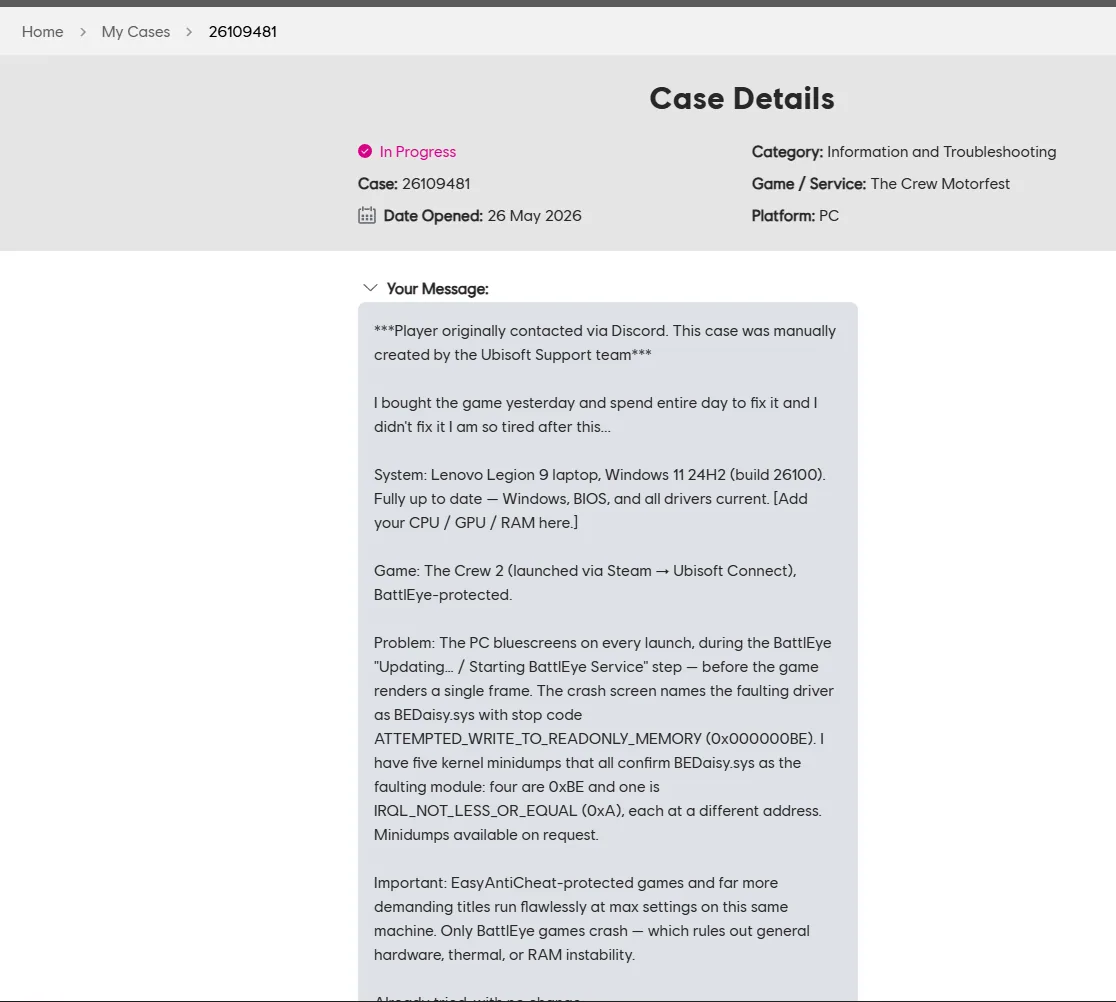
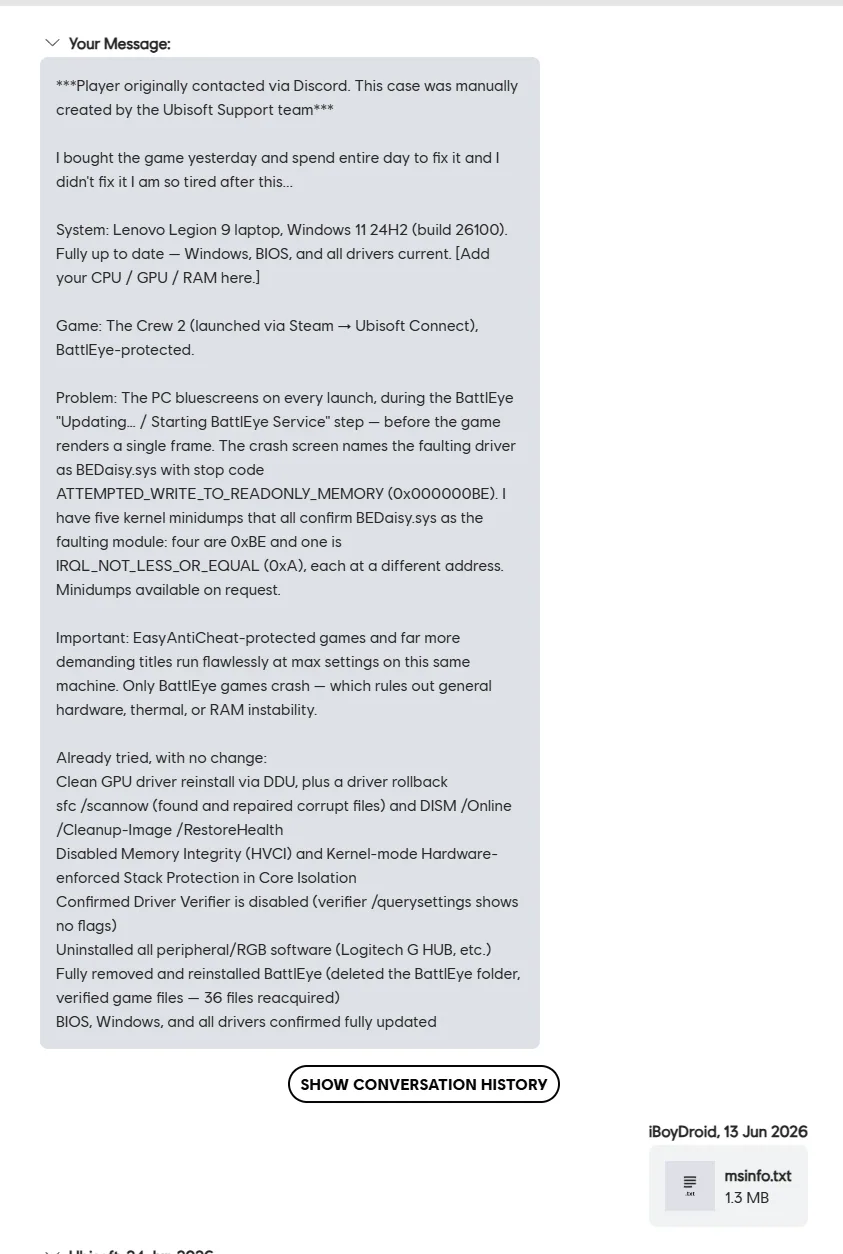
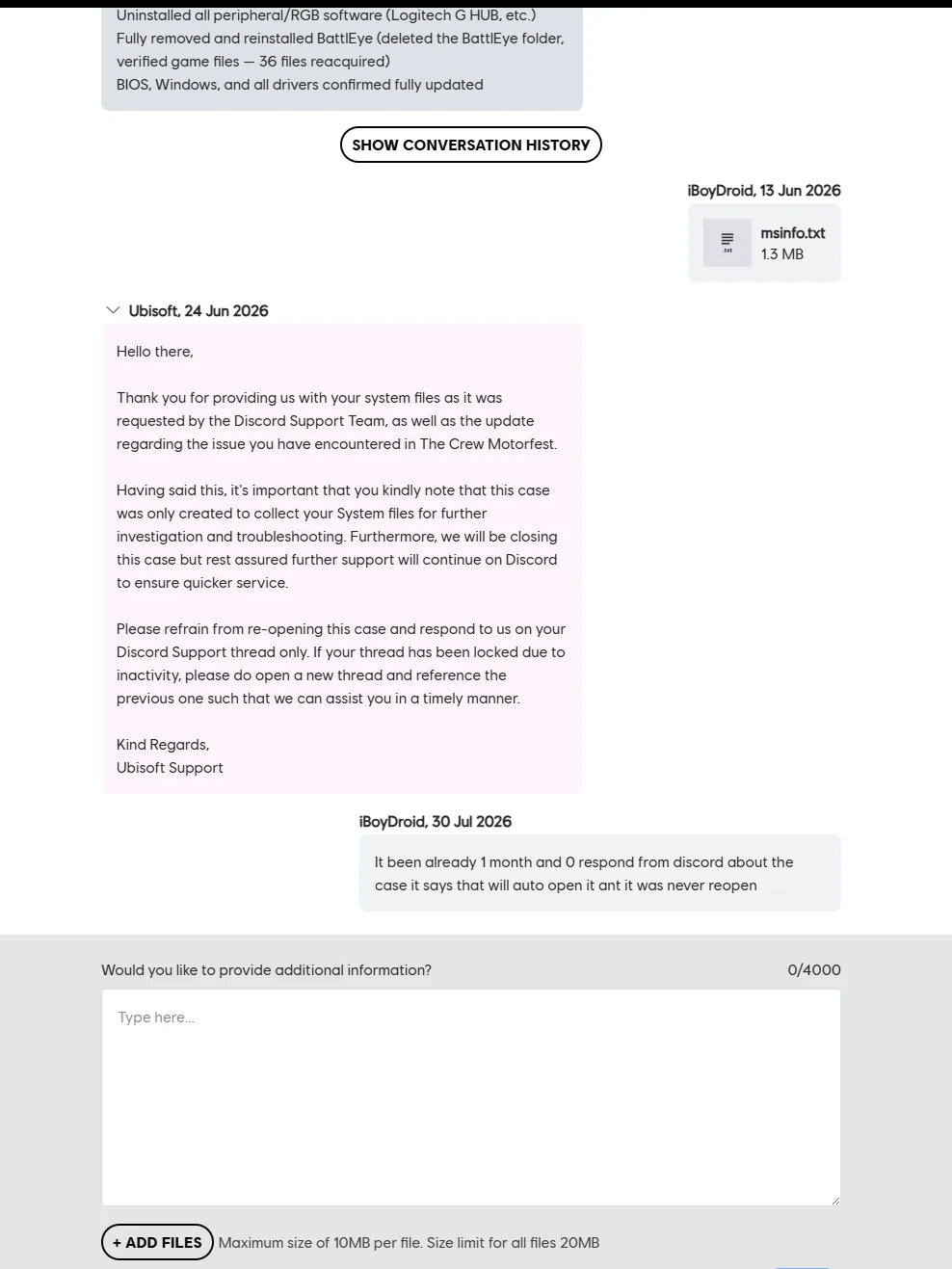
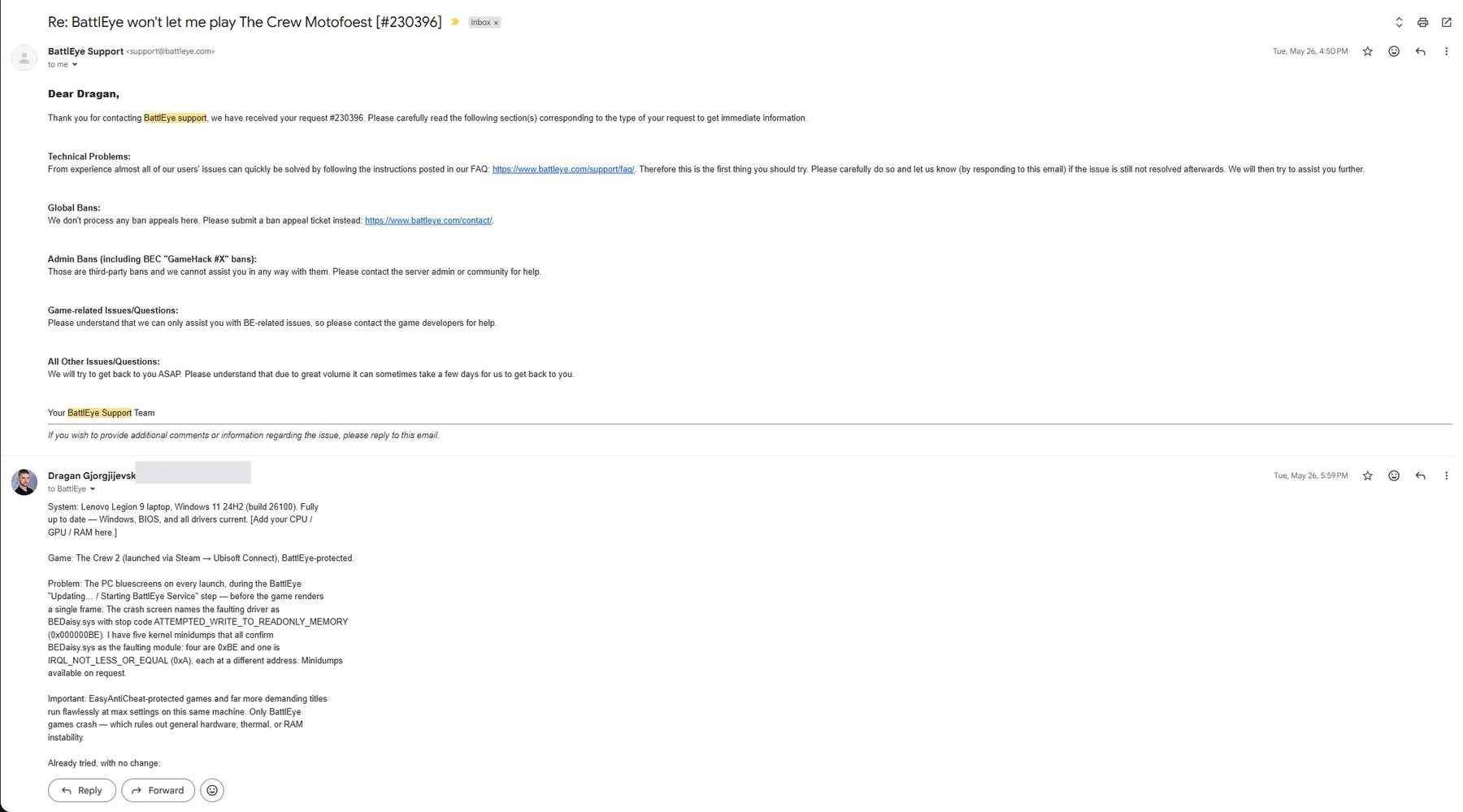
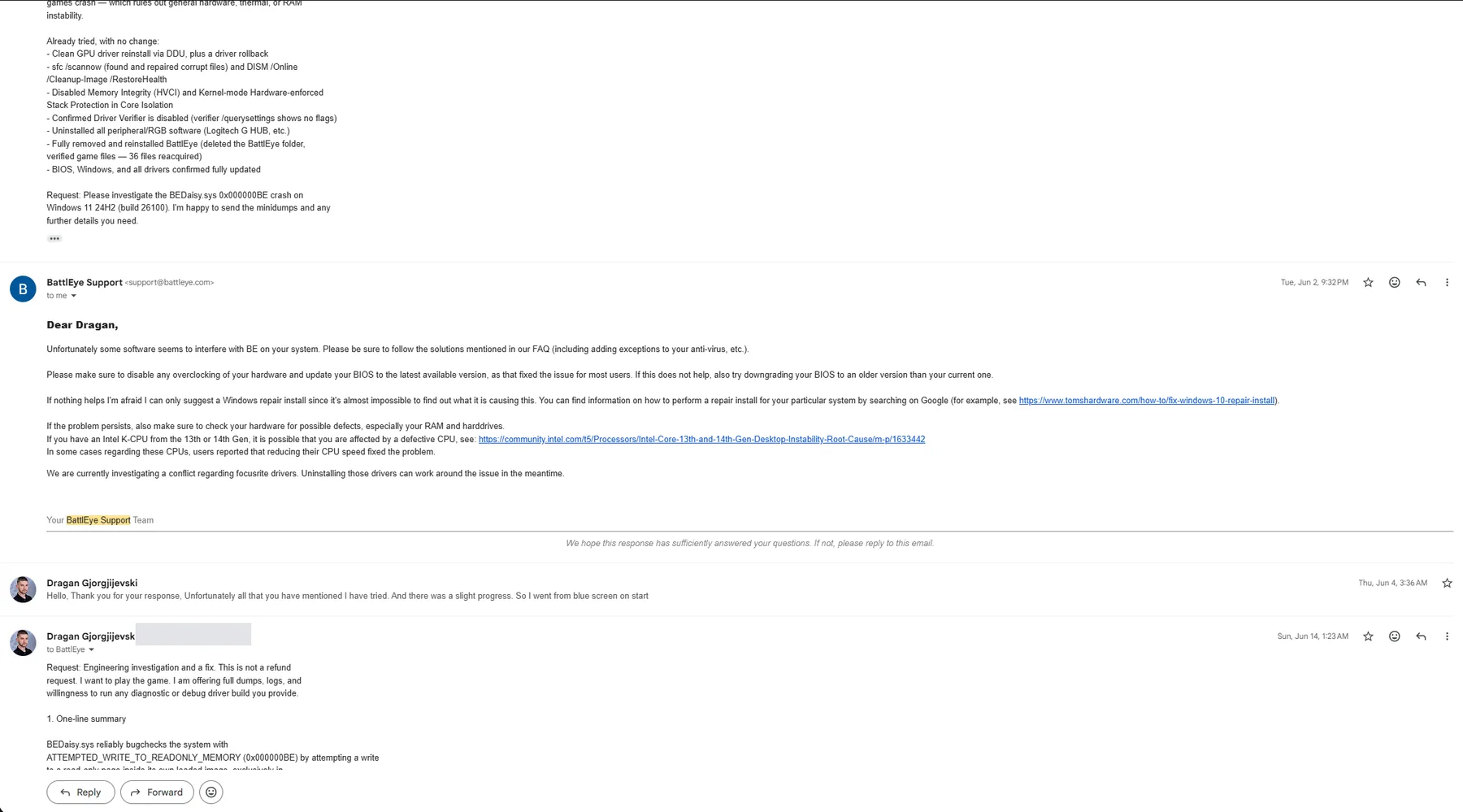
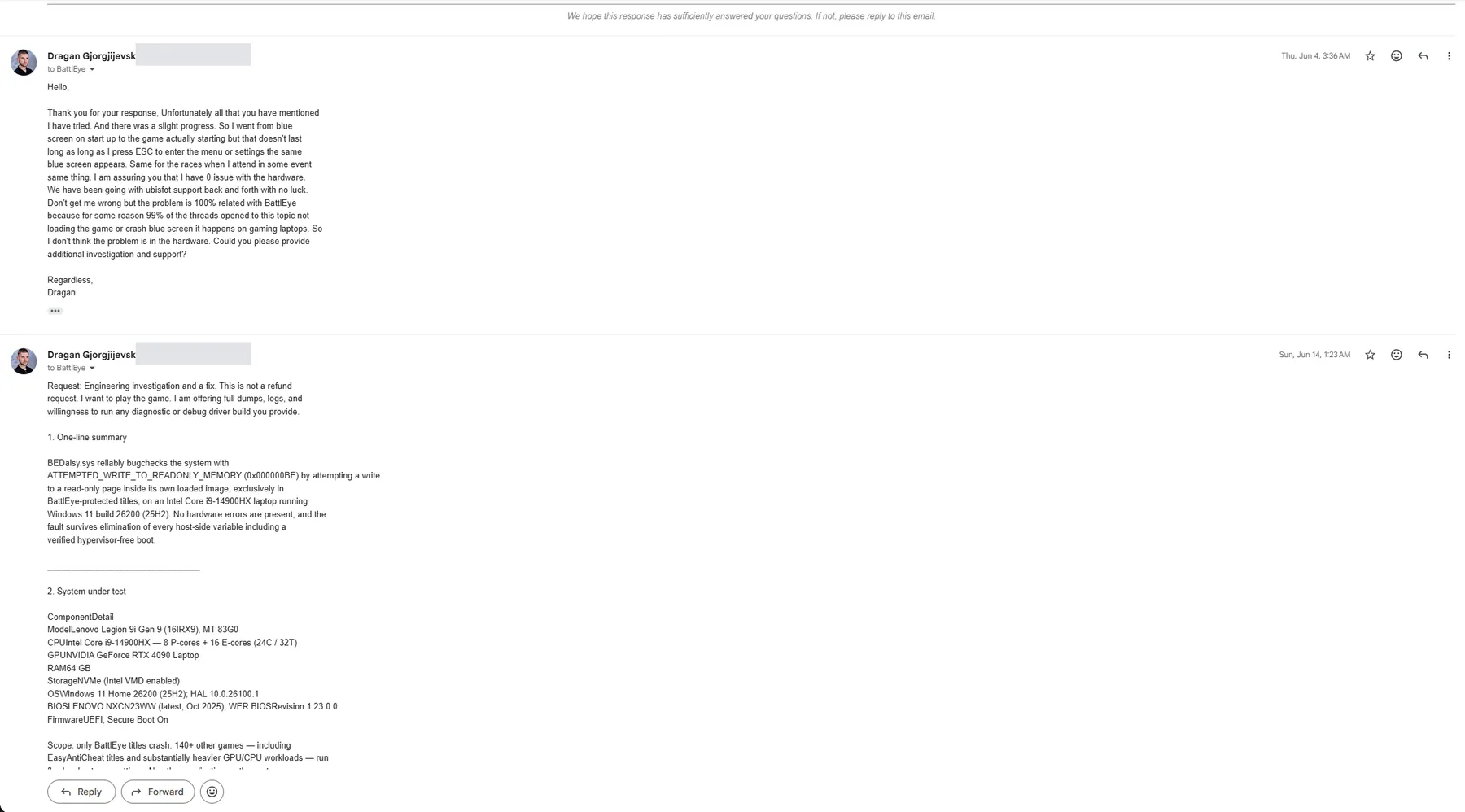
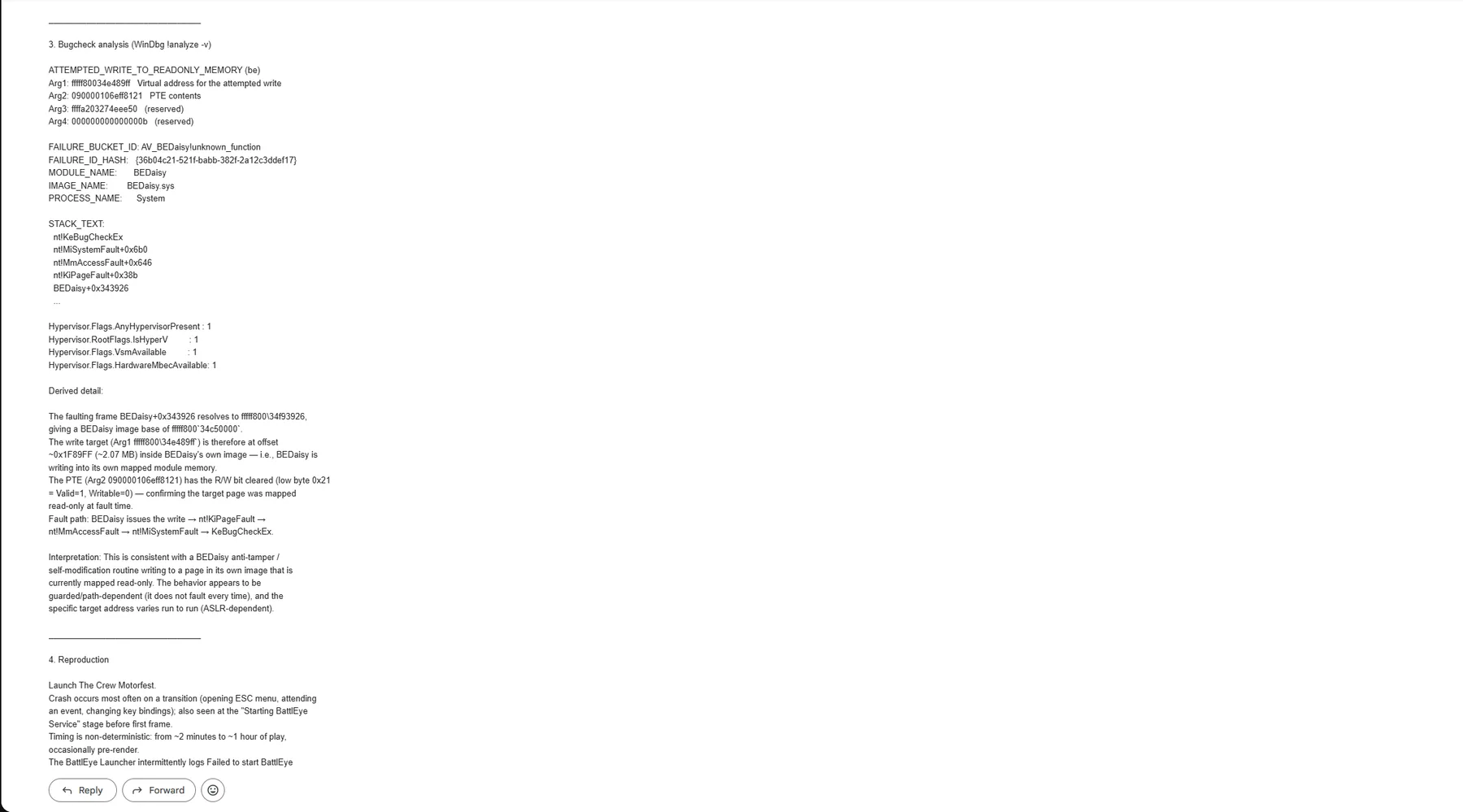


![Locked Discord support thread titled '[PC - Technical] Reproducible BSOD (BEDaisy.sys, stop code 0xBE) launching The Crew Motorfest', showing the user's 1 June messages, a support reply the same day declining a remote session and requesting DxDiag and MSInfo, and the 9 June lock notice citing inactivity and missing files](/case-studies/the-crew-motorfest/E-10.webp)
Appendix E. Method note: parsing kernel minidumps without a debugger
In session 1 there was no WinDbg and no symbol server, so the ten minidumps were parsed by hand in a Python sandbox. The approach, for anyone who needs to reproduce it:
- Header. A Windows 64-bit kernel minidump starts with the signature
PAGEDU64. The bug check code is a 32-bit value at offset0x38; the four bug check parameters are 64-bit values starting at0x40. These five values alone classify the crash. - Triage dump block. A second header at offset
0x2000holds offsets into the file for the loaded-driver list (offset and count), the string pool (offset and size) and the saved call stack (offset and size). The field positions were validated empirically against the data rather than taken from documentation: driver entries were checked for plausible kernel base addresses and sizes, and string-pool entries for valid UTF-16 driver file names. - Module map. Each driver entry yields a base address, image size and name length. Sorted by base, they form a map. Any kernel address can be resolved to "which module, at which offset" with a binary search.
- Resolution. For a 0xBE, parameter 1 is the write target; for a 0x50, parameter 3 is the faulting instruction; for a 0xA, parameter 4 is the faulting instruction. Resolving those against the map is what produced "inside a 7.5 MB module at
+0x28a2ca, every time". The module's name length (eleven characters) identified it asBEDaisy.syseven where the string pool did not resolve cleanly. - Call stack. The saved stack region was scanned for 64-bit values in the kernel address range and each was resolved against the map, giving the order of modules on the stack at the crash.
- Event logs.
python-evtxiterated every record; Event 1001 (BugCheck) and Event 41 (Kernel-Power) were extracted with theirSystemTimeand data fields, which gave the crash timestamps and, in session 2, the WHEA-Logger count (zero) and the Hyper-V and IsolatedUserMode start events that exposed the Credential Guard lock.
WinDbg in session 2 confirmed the hand-parsed conclusions and added the faulting instruction, the exact PTE and the failure bucket.
Appendix F. Update log
| Date | Change |
|---|---|
| 27 August 2026 | Initial compilation of both investigation sessions, the vendor record and external sources. Same day: all open factual items confirmed by Dragan and written in (game title correction, BIOS downgrade, in-place repair, Intel RST in BIOS, Windows update policy, Apple drivers, hardware diagnostics, external hardware, other BattlEye titles, Discord reopen status, last test date 30 July, no Focusrite). |
| 27 August 2026 | Added section 12.3, community reports: public threads on BEDaisy.sys crashes and on The Crew titles under BattlEye, each re-opened and checked, with what worked for whom. Sources table extended. Page moved to full width with per-section layouts; scroll performance fixed. |
| 27 August 2026 | Published on iboydroid.com. Next re-test will be logged here with the Windows build, the BattlEye driver version and the result. |
Appendix G. Glossary
| Term | Meaning here |
|---|---|
| BattlEye | Third-party anti-cheat used by Ubisoft's Crew titles and many other games. Installs a Windows service (BEService.exe) and a kernel-mode driver (BEDaisy.sys) every time a protected game starts. Cannot be disabled by the player. |
| BEDaisy.sys | The BattlEye kernel driver. Named as the faulting module in every crash in this case study. |
| EAC (Easy Anti-Cheat) | A competing kernel-mode anti-cheat. Games protected by it run without fault on this machine, which is why "kernel anti-cheat in general" is not the explanation. |
| Bug check / stop code | The code Windows records when it halts on a fatal kernel error. 0xBE is ATTEMPTED_WRITE_TO_READONLY_MEMORY. |
| Minidump | The small crash file Windows writes to C:\Windows\Minidump\ on each blue screen: registers, stack, loaded-module list. |
| PTE | Page table entry. The kernel's record of where a page of memory lives and what is allowed on it. Its low bits say whether the page is present and writable. |
| WHEA | Windows Hardware Error Architecture. WHEA-Logger events in the System log are the hardware's own reports of machine-check errors. None were recorded here. |
| VBS / HVCI | Virtualization-based security and Hypervisor-enforced Code Integrity (shown as "Memory Integrity" in Windows Security). Both depend on a hypervisor running underneath Windows. |
Credential Guard / lsaiso.exe | A VBS feature that isolates credentials in a separate process (lsaiso.exe). When UEFI-locked, it relaunches the hypervisor even when boot settings say otherwise. |
| Intel VMD | Volume Management Device, the NVMe storage controller mode. Not virtualization. Disabling it on a system installed with it enabled can make the boot drive disappear. |
| E-cores / Atom cores | The sixteen efficiency cores on the i9-14900HX. "Active Atom Cores" is the BIOS switch that disables them. |
| DxDiag / MSInfo | User-mode inventories of the system. Useful for driver versions and hardware lists; they contain nothing about a kernel fault. |
Respuestas breves, según el registro
Cada respuesta se extrae de la evidencia anterior y enlaza a la sección que contiene la prueba.
- What does the BEDaisy.sys ATTEMPTED_WRITE_TO_READONLY_MEMORY (0xBE) blue screen mean?
Stop code 0xBE means kernel-mode code tried to write to a memory page that Windows had mapped read-only. Only drivers and the kernel itself can raise it; a game, a launcher or an overlay cannot. In every dump opened in this study the writer was BEDaisy.sys, BattlEye's kernel anti-cheat driver, and the target page was inside the driver's own loaded image, mapped read-only (the June WinDbg dump shows PTE low byte 0x21: present, not writable). The behaviour is consistent with a self-check or anti-tamper routine inside the driver.
Leer la sección- Is a BEDaisy.sys 0xBE crash caused by faulty hardware?
Not on this machine, and the evidence is on record: zero WHEA-Logger events in every crash session, every firmware-level and Windows-level hardware diagnostic passing, over 140 other games (including Easy Anti-Cheat titles) running at maximum settings, and an identical crash with Turbo Boost off, power limits reduced, E-cores off, Hyper-Threading off and every external device disconnected. A silicon fault that hits the same instruction offset inside one vendor's driver and nothing else is not what silicon faults look like.
Leer la sección- Does disabling Hyper-V, Memory Integrity or virtualization-based security fix the BEDaisy.sys crash?
It did not here. Memory Integrity was off for two weeks, then the whole stack was removed: Local Security Authority protection, VBS, HVCI and Credential Guard through the registry, the Hyper-V and WSL features, hypervisorlaunchtype off, and VT-x and VT-d off in BIOS. With msinfo32 reporting 'Virtualization-based security: Not enabled' and no lsaiso.exe running, the game crashed with the identical signature. One warning: a UEFI-locked Credential Guard silently relaunched the hypervisor on the earlier attempts, so a bcdedit setting or a BIOS switch alone is not proof that it is off.
Leer la sección- Does a BIOS update, Turbo Boost off or a lower CPU ratio fix BEDaisy.sys crashes on Intel 13th and 14th gen CPUs?
For some desktop users, yes. In the public threads collected in this study the fixes that recur are a motherboard BIOS or microcode update, Turbo Boost off, one P-core ratio step down in Intel XTU, or a lower power profile, and each of them also explicitly failed for other posters. On this Lenovo Legion 9i (i9-14900HX, a mobile part outside Intel's desktop advisory) a BIOS downgrade and re-update, Turbo Boost off, reduced power limits and E-cores off changed nothing, and laptop firmware does not expose the ratio and voltage controls the desktop fixes rely on.
Leer la sección- Why does The Crew Motorfest blue screen on launch?
On this machine the game blue-screened during BattlEye's 'Starting BattlEye Service' step, before the first frame, because BEDaisy.sys faulted as soon as it loaded. Reinstalling the game and BattlEye, verifying files, clearing the Ubisoft Connect cache, a clean boot, a fresh Windows profile, overlays off and every other frontline step left the crash identical. Disabling Intel Rapid Storage Technology in BIOS only moved the crash from launch to in-game transitions. The player cannot disable BattlEye, so there is no user-side workaround; the fix has to come from the driver.
Leer la sección- How do I check whether my blue screen is this BEDaisy.sys fault?
Open the newest file in C:\Windows\Minidump in WinDbg and run !analyze -v. If MODULE_NAME is BEDaisy, FAILURE_BUCKET_ID is AV_BEDaisy!unknown_function and Argument 2 ends in 21, you have this fault. Then filter the System event log on WHEA-Logger: any Error or Warning entries mean your hardware is reporting faults and this page does not apply to you. The full fifteen-minute self-check, including the msinfo32 check that proves whether the hypervisor is really off, is in section 16.
Leer la sección- Has anyone else hit the same crash inside BEDaisy.sys?
Yes. A Microsoft Q&A thread from January 2025 contains WinDbg output from a different user on a desktop i7-13700KF running Windows 10 and Rainbow Six Siege, crashing at the identical instruction offset BEDaisy+0x343926 with the same failure bucket AV_BEDaisy!unknown_function and the same failure hash. Another Lenovo Legion owner reported BEDaisy.sys blue screens in The Crew Motorfest in June 2025, and public reports of 0xBE in BEDaisy.sys go back to 2019.
Leer la sección- Has BattlEye or Ubisoft fixed the BEDaisy.sys 0xBE crash?
Not as of the last update to this page (27 August 2026). BattlEye's only reply beyond the automated acknowledgement was a generic checklist on 2 June 2026; it has not answered the 4 June follow-up or the 14 June seven-section engineering report. Ubisoft collected DxDiag and MSInfo, never requested a minidump, locked the Discord thread on 9 June and closed the case on 24 June. This is a living document and is updated when either vendor responds or a re-test changes the result.
Leer la sección- How was AI used in this investigation?
Claude did the analysis: it parsed ten kernel minidumps by hand with no debugger and no symbols, parsed five event-log sessions, decoded the page table entry and the offset arithmetic, and wrote the vendor reports. The human supplied the raw artifacts, held the constraints the AI kept trying to explain away (140 games run fine, Easy Anti-Cheat titles run fine), ran every BIOS and registry change on real hardware, and kept every dump and log. The shared rule was one test per hypothesis, one variable at a time, with the result read from a log; the AI insisted on it whenever the human wanted to flip four BIOS switches at once. The AI was wrong more than once, twice in the direction of blaming hardware, and the evidence killed each of those hypotheses.
Leer la sección
Siguiente caso
¿Tienes un problema que merezca documentarse?
Cada caso empieza como trabajo real: un flujo de trabajo que reemplazar o un fallo que nadie más quiere mirar. Describe el tuyo y puede convertirse en el próximo informe de campo.